Everyone Records the MySQL Audit Log. Nobody Reads It.
Almost nobody reads the audit log, because reading it is painful. There is a cheaper shape: keep the answer, not the log.

Imagine typing this into a chat window: who deleted the rows from orders on Tuesday night, and what exactly did they run?

And getting a straight answer: “One account. Sixty-seven row changes”. Every one attributed, the statements quoted back verbatim, and a note about what could not be proven. No ssh, no log files, no query to write.
You can. With DB Trail.
Why nobody answers this today
A row goes missing, somebody asks who deleted it, and in most teams nobody knows. Not for lack of evidence. Enterprise Audit gives you three ways to read it, and none of them is a query.
- You grep the files on the database server.
- Or you switch the log to JSON and page through
audit_log_read(), which seeks to a timestamp and then hands you 32 KB at a time, with no way to say WHERE user = or WHERE table =. - Or you ship the files somewhere that does have a query engine, which means running a logging platform all year for a question you ask twice a year.
On RDS it is not even that log. Amazon audits MySQL with the MariaDB plugin: plain text, no JSON, no audit_log_read(), and the statement truncated at 1,024 characters by default. The files live on the instance under a small rotation budget and come out one portion at a time through DownloadDBLogFilePortion, so the supported path is to publish them to CloudWatch, billed per gigabyte in and per gigabyte scanned.
A consultancy wrote up a real client: 1 TB a month, five-year retention, roughly $6,500 a year in ingestion and storage and past $30,000 across the window. Their fix was to cut the CloudWatch window to 30 days and lifecycle the rest into Glacier Deep Archive. Readable, in the sense that a restore, a table definition and someone who remembers the schema make it readable. The audit log stays affordable as long as nobody asks it anything.
So people stop asking. You pay to record evidence you never read, and what you recorded tells you which statements ran, not which rows left.
Keep the answer, not the log
Ask what an audit log is for, forensically. Its whole job is to prove one thing: which account held connection 58, and between which two instants. That proof is small, it stops changing when the session ends, and it does not need to sit in a log for five years.
So a DB Trail capture daemon reads your live session list twice a second, reads the audit log once a minute if you have one, and writes down the sessions behind each indexed change. One row per session, not per event. A session that changed a million rows is one row. Audit logs grow with your statements; this grows with your connections, so it can be kept forever.
Which flips the economics. The log only has to survive long enough to be read once, minutes, not years. The answer outlives it rotating, the events aging into Parquet on S3, and the source server being switched off.
It also explains the no-plugin case. The poller alone gives you the name; the plugin adds the connect and disconnect records that bracket a session, which is the difference between very probably right and provably right.
Three ways to ask
Ask Claude
The console exposes the engine as MCP tools, so Claude Desktop or Claude Code can ask in words (setup here).
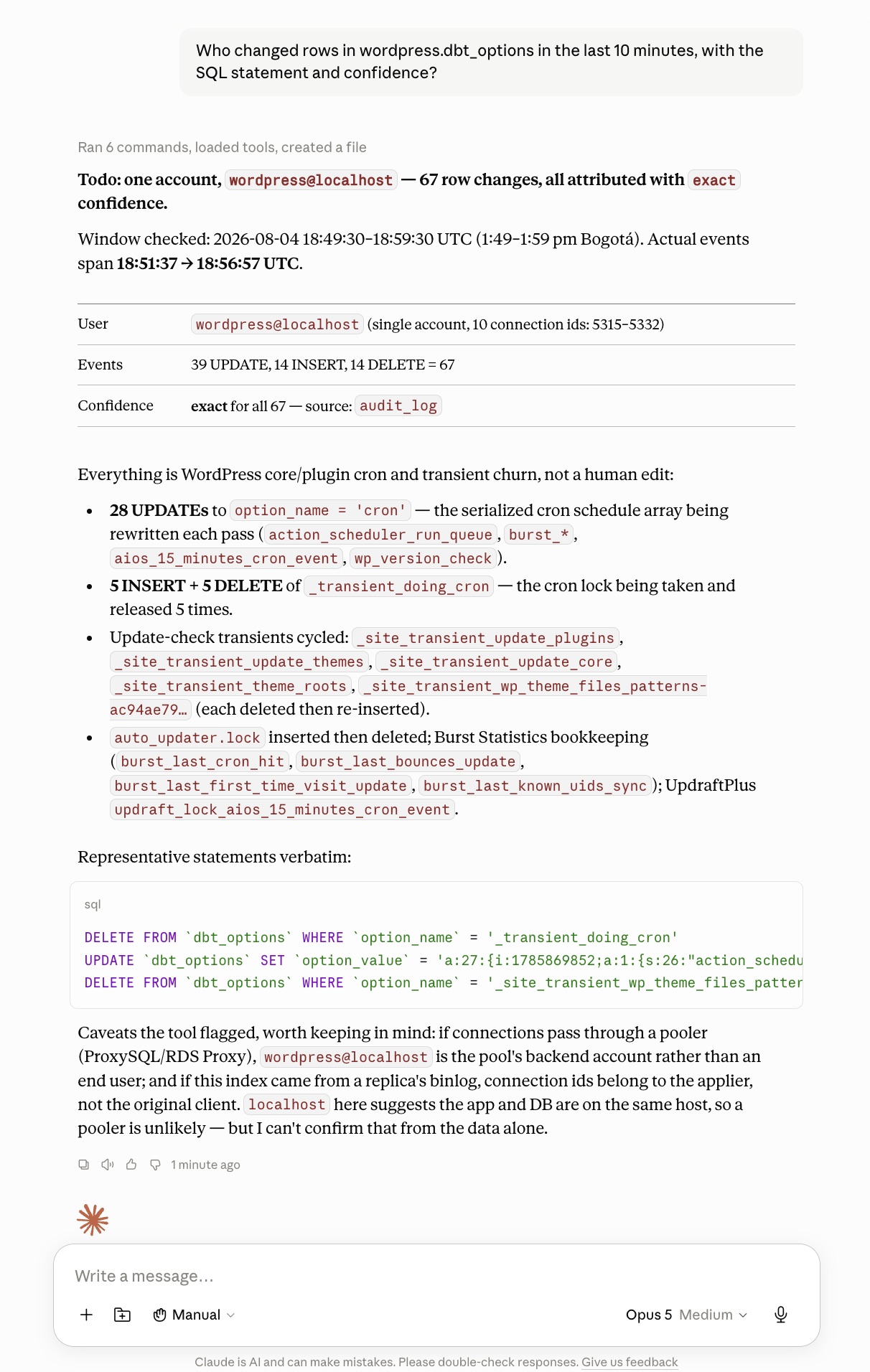
The tools take no DSN, so a client cannot point the daemon at another database, and they never fake a clean answer: ask about a window with no evidence and the reply names the sources it could not reach.
Click it
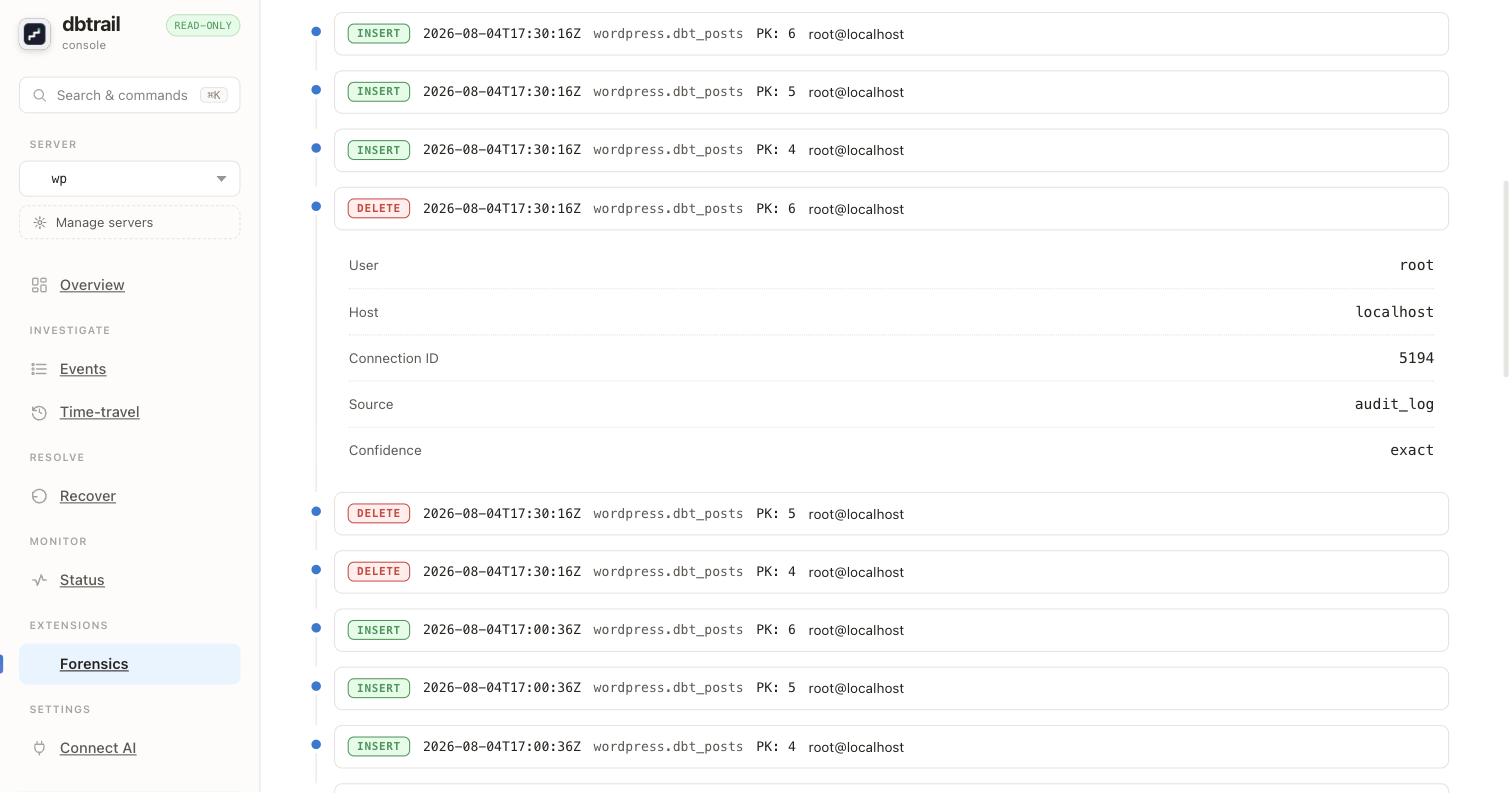
From the terminal
Same engine, same filters, JSON output, for when you want to script it. The forensics documentation has the flags.
Reading the answer
Three labels, and they mean different things.
- exact: proven, the log shows that connection belonged to this account and its session was open at that moment.
- corroborated: the name matches the number, but nothing proves the session was open then. Strong evidence, not proof.
- heuristic: more than one candidate matched and dbtrail picked the likeliest, and says so.
Some things no tool can tell you. Behind a connection pooler the database sees the pool’s session, so many users share one identity. A replica’s binlog carries the applier’s connection ids, not the client’s.
And none of it needs an audit plugin, if you don’t want one
The connection behind every row change is already in your binlog. The name behind that connection is in performance_schema.threads, on by default in MySQL 8, which joins to the binlog on PROCESSLIST_ID. With one catch: that row disappears the moment the session ends.
The mapping has to be captured while the connection is alive. Nobody has it three weeks later, in the middle of the incident, which is the only time anyone wants it. The original SQL is one dynamic flag away: binlog_rows_query_log_events, off by default, SET GLOBAL without a restart, and from then on the statement text rides along with the row events.
The part no audit log can do
Knowing who is half an incident. Every indexed event also carries the row as it was, so the same evidence that named the person reverses the damage:
-- Recovery SQL generated by bintrail
-- 1204 statements. Review before applying.
INSERT INTO `app`.`orders` (`id`, `customer_email`, `status`, `total`, ...)
  VALUES (4821, 'maria.lopez@example.com', 'pending', 149.90, ...);
Nothing runs. You get the reversal SQL to review and apply in a transaction, rebuilt from the before images, scoped to that one transaction. The recovery guide has the rest.
At any budget, an audit log ends at “here is who to blame”. This ends at “here is your data back”.
Capture has to be running before the row goes missing, which makes the quick start a calm day job.
Get new posts by email
One email when a new post is out. Nothing else, and you can unsubscribe from any email.