I spent 4 hours restoring a backup for one deleted row

Someone ran a DELETE without the right WHERE clause. One row gone. One customer record. And I spent the next four hours of my life getting it back.
This is not a dramatic retelling. This is what actually happens when you lose a row in production MySQL and don’t have a fast way to recover it.
The moment
You get a message. Usually Slack, sometimes a phone call if it’s bad enough. “Hey, customer X can’t log in” or “this order disappeared” or “the billing data looks wrong.” You check the table. The row is gone.
Your stomach drops. Not because one missing row is the end of the world. But because you know what comes next.
The rational part of your brain knows the data is probably in the binlog. If you’re running binlog_format=ROW and binlog_row_image=FULL, MySQL recorded the full row before it was deleted. You could parse the binlog, find the event, and reconstruct an INSERT. For one row, that should work. But at 3am, under pressure, you don’t trust yourself to get it right on the first try. So you default to the process you know: restore the backup, replay the binlogs, get the full dataset to a known state, and extract the row from there. The slow, safe way.
The mental checklist
This is the part nobody talks about. The actual recovery might take 30 minutes or 4 hours depending on your setup. But the mental load starts immediately, and it’s the same every time:
Do we have a backup?
You’re pretty sure you do. You set it up. But when was the last time you verified it? Last month? Last quarter? You open the backup system and check. It’s there. Last full backup: 6 hours ago. Okay. Probably fine.
Is the backup corrupted?
You won’t know until you try to restore it. This is the first prayer of the night.
Do we have binlog backups?
The full backup is from 6 hours ago. The DELETE happened 20 minutes ago. You need the binlogs to replay everything that happened between the backup and the moment before the DELETE. If the binlogs are gone, you get the data from 6 hours ago and lose everything in between. That’s not a recovery, that’s a different disaster.
Where do I restore this?
You can’t restore a 500GB backup on the production server. You need a temporary instance. Do you have one ready? Probably not. Now you’re spinning one up, installing MySQL, configuring it, waiting for it to be ready. 15 minutes if you’re lucky. More if you’re not.
Do I remember how to do this?
You’ve done it before. Maybe twice. Maybe three times in 15 years. It’s documented somewhere. Probably. You open the runbook and hope past-you was thorough.
How long is this going to take?
Restoring a full backup takes time proportional to the size of the database. 500GB? Two to four hours. For one row. You know this is absurd. You could have gone straight to the binlog. But you’ve seen too many things go wrong with manual recovery under pressure, so here you are, watching a progress bar.
Are there foreign keys?
Please no. If the deleted row had dependent rows in other tables, you might need to restore those too. And their dependents. And theirs. You check the schema. You pray.
When do I stop replaying binlogs?
This is the tricky part. You need to replay the binlogs up to the exact second before the DELETE. Not one second after, or you’ll replay the DELETE itself and end up exactly where you started. Finding that exact position in the binlog is not fun. It involves mysqlbinlog, grep, timestamps, GTID positions, and a lot of scrolling through events that look like this:
### DELETE FROM `production`.`customers`
### WHERE
###   @1=16791
###   @2='User_3358'
###   @3='u3358@example.com'
This is the part that haunts you. The data was here the whole time. You could have skipped the backup entirely and just extracted this row. But even now, turning it into a usable INSERT statement is another 15 minutes of manual work, copy-pasting values, matching column positions to column names (because ROW-based binlog events use @1, @2, @3 instead of column names by default), and hoping you didn’t mess up the quoting.
And if someone ran an ALTER TABLE between the time that event was written and now, those @N positions may not map to the columns you think they do. Good luck figuring that out at 3am.
The workarounds
Over the years, I’ve built up a collection of tricks to make this faster. None of them are clean.
The delayed replica trick. If you have a replica running with a delay (say, 1 hour behind), and the DELETE happened less than an hour ago, you can just query the replica. The row is still there. This is the best case scenario. But it only works if you set up the delayed replica before the incident, if the delay window covers the incident, and if you actually remember it exists at 3am.
The mysqlbinlog pipe trick. Instead of restoring the full backup, you create an empty copy of the table, then replay the binlog into it. The trick is you use a MySQL user that only has write permissions on that specific table, so all the other events in the binlog fail silently. You run it with --force and ignore the errors. It’s clever. It’s also fragile, undocumented, and I’ve never been 100% sure it works correctly every time.
The MariaDB flashback trick. MariaDB has a --flashback option for mysqlbinlog that can reverse DML events. A DELETE becomes an INSERT. Clever. But it doesn’t handle foreign keys, it requires MariaDB’s version of mysqlbinlog (it can read MySQL binlogs, but GTID compatibility is unreliable), it breaks on encrypted binlogs, and I’ve never fully trusted it in production.
Oracle solved this problem for its own ecosystem over 20 years ago with Flashback — a family of features that lets you query any table as of a past timestamp, reverse committed transactions, and recover dropped tables. If you’ve ever used Oracle, you know how powerful it is. MySQL has had nothing equivalent. Until now.
The real cost
The technical time is one thing. The four hours, the temporary server, the binlog parsing. But the real cost is everything else:
The engineer who ran the bad DELETE is sitting there watching you, feeling terrible. The customer whose data disappeared is waiting. Your manager is asking for an ETA every 30 minutes. And you’re doing archaeology in binary log files hoping you don’t make a mistake that turns a one-row problem into a bigger one.
And through all of it, you know that the data you need is right there. In the binlog. MySQL recorded the entire row before it was deleted. The before-image is sitting in a file on disk. You just can’t get to it without going through this whole process.
That’s what made us angry enough to build something.
What we built
We built dbtrail — continuous data protection for MySQL.
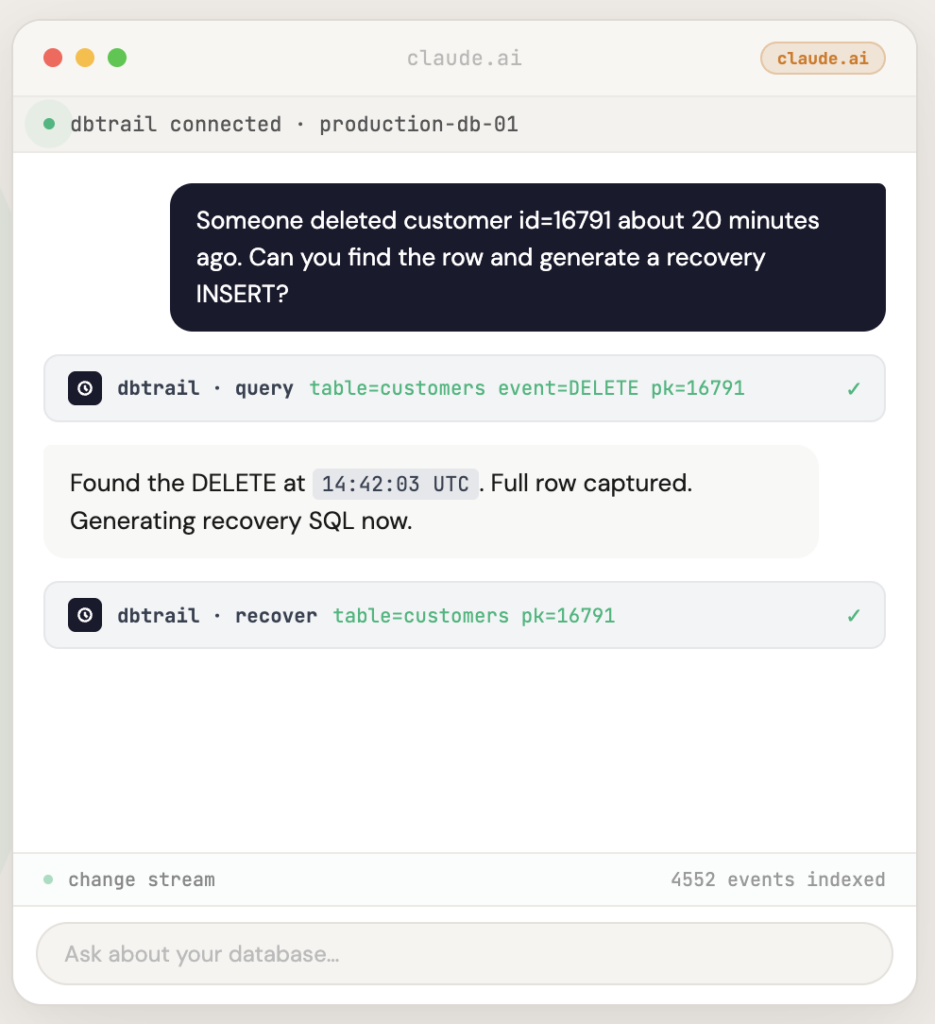
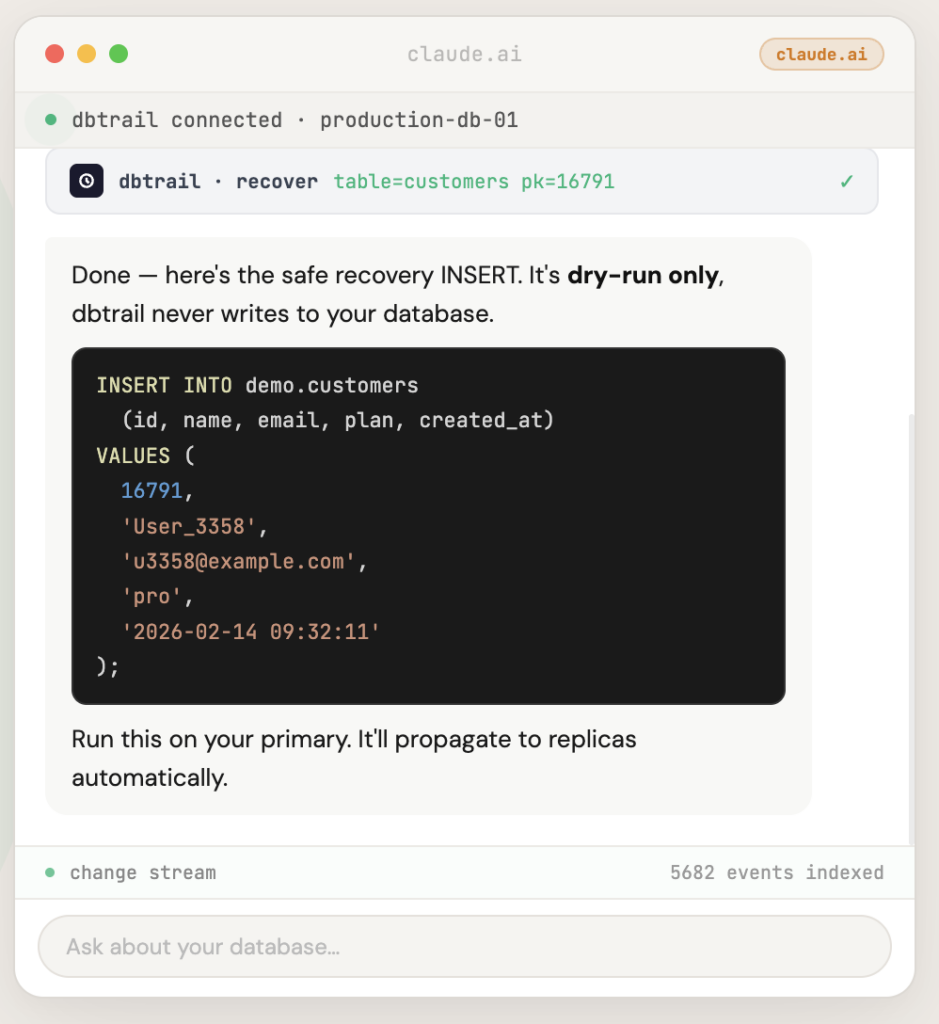
The idea is simple: if MySQL already records every change in the binlog, why can’t I just query
The idea is simple: if MySQL already records every change in the binlog, why can’t I just query that history directly? Why do I need to restore a backup, replay logs, parse binary events, and manually reconstruct INSERT statements?
dbtrail captures every INSERT, UPDATE, and DELETE from your MySQL binlog with full before-and-after row data and indexes it continuously. The open-source capture agent, bintrail, runs inside your infrastructure — dbtrail never needs direct access to your database. When someone deletes the wrong row, you don’t restore a backup. You ask “what happened to row 16791?” and get the recovery SQL in seconds.
No temporary servers. No binlog parsing. No praying.
dbtrail also solves the @N mapping problem I described above. It tracks your schema continuously, including across ALTER TABLE events, so it always knows which @1 corresponds to which column — even for events that were written weeks ago under a different table structure. No open-source binlog tool handles this correctly.
One important prerequisite: your MySQL server needs binlog_row_image=FULL (not MINIMAL or NOBLOB) for complete before-and-after row capture. It’s a dynamic variable — you can change it without restarting MySQL. Check our docs for the full setup guide.
The same mental checklist that used to take me through an hour of stress now takes 30 seconds:
- Do I have the data? Yes, dbtrail has been indexing continuously since the day it was installed.
- Can I see what was deleted? Yes, full row with all column values.
- Can I get recovery SQL? Yes, generated automatically, ready to review.
- Are foreign keys handled? Yes, FK-aware dependency resolution up to 5 levels deep.
- Do I need to remember how to do this? No.
That last point matters more than I expected. You can use dbtrail three ways: the web dashboard for visual search and filtering, the REST API for scripting and automation, or the MCP gateway that lets you describe what happened in plain English from Claude, Cursor, or any MCP client — and get the recovery SQL back. At 3am, during an incident, with people watching, you don’t want to remember mysqlbinlog flags or grep syntax. You want to say “someone deleted customer 16791, find the row and generate a recovery INSERT” and get the answer.
The compliance bonus
Here’s something I didn’t expect when we started building this: the continuous change trail that makes recovery fast is also exactly what auditors want to see. SOC 2, HIPAA, PCI-DSS, and GDPR all require some combination of demonstrated recovery capabilities, tested backup procedures, and audit trails showing who changed what and when. dbtrail provides all of that as a byproduct of doing its primary job. If you’re in a regulated environment, this isn’t just a recovery tool — it’s evidence that your recovery actually works.
Try it
dbtrail has a free tier — one server, no credit card required.
If you’ve been through the checklist I described above, you know why this exists. If you haven’t yet, you will. And when you do, you’ll want dbtrail already running.