DB Trail Open Source now has a UI

DB Trail now has a web console. That is the short version 🙂
For as long as dbtrail has existed, you drove it from the command line: find the change you care about, get the SQL to undo it, move on. It works, and honestly it is great once the commands are in your fingers. But that is the thing, you had to know the commands. We never loved that. You should not have to remember the flags of bintrail recover just to find out which rows a bad query touched.
So we built a face for the engine. Now you open a browser, you see what changed in your MySQL with the full before and after, you click, and you get the exact SQL to put it back. And like everything else in dbtrail, the console is Apache-2.0, it installs with one command, and it runs completely on machines that you own.
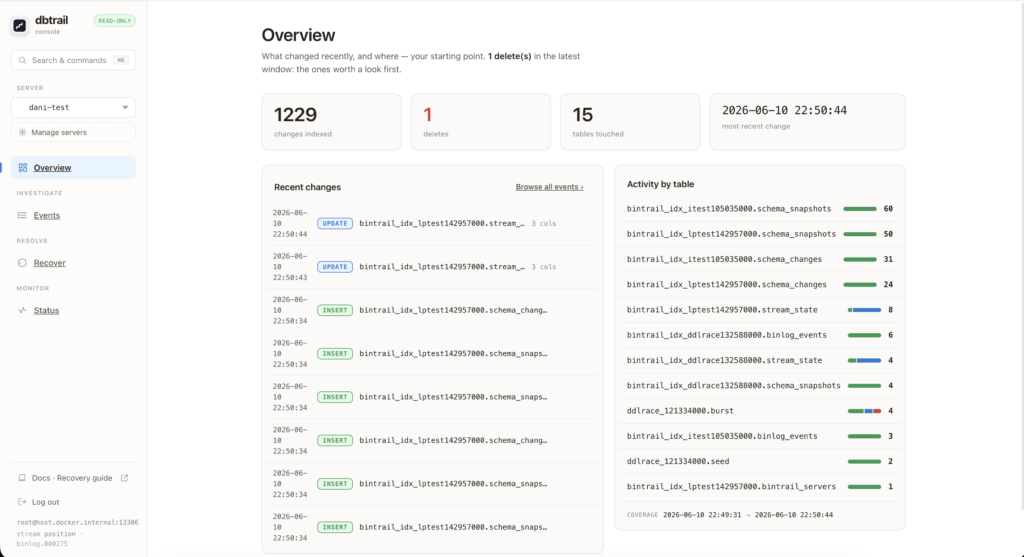
What changed, and how to put it back
Let me show you how it feels. A customer writes to you: my order is gone. You open the console.
The Overview page answers the first question, what changed recently and where. You get the numbers up top (changes indexed, deletes, tables touched, the most recent change), a list of the recent changes, and a little breakdown of activity by table. Deletes sit right on top, because a delete is usually the thing that hurts.
You click into Events. There is a search box: free text plus small tokens like type:delete, pk:, col: and schema.table. Every result opens in place and shows you the before and after diff. And there it is, your DELETE on orders, with the whole row image: who it was, the amount, the state it was in. You move with j/k, open with ↵, jump to recovery with u. No SQL typed yet.
Now Recover. You point it at that primary key, you preview the affected rows with their diffs, and you click Generate undo SQL. The console gives you a script, wrapped in a transaction, that puts that row back exactly as it was.
And then it stops. The console never runs SQL for you. It writes the reversal script, you read it, you apply it. This is on purpose. dbtrail tells you what happened and hands you the exact statements, but you stay the person who runs them on production, not us. We think that is how it should be.
That is the whole loop: see what changed, then undo exactly the rows you need, from a browser instead of a terminal.
One command to run it
curl -fsSL https://raw.githubusercontent.com/dbtrail/dbtrail/main/install.sh | shThat pulls the Compose stack, starts it, waits for the console and tells you what to do next. Then:
- Open http://127.0.0.1:8090. On the first run you create a username and a password. That is your login from now on.
- Click + Add server and paste the MySQL you want to watch (host, user, password). dbtrail runs the checks, creates an index, and starts streaming in less than a minute.
And “+ Add server” is a real control plane, not just a list of bookmarks. It runs the bintrail doctor checks right there (if something is missing you get a card with the exact GRANT to copy), it creates a dedicated index database for that source, and it starts a supervised stream that picks up from its checkpoint after a restart. Add a second server, a third one, and the switcher up in the header flips every view between them, one per browser tab.
And if you just want to play with it before connecting anything serious, one container, zero setup:
docker run --rm -p 6033:6033 ghcr.io/dbtrail/bintrail-demoThe best part: it is yours
This is the part we are most proud of. dbtrail’s recovery and time-travel engine, and now the console too, are Apache-2.0. Free for any use, including commercial and production. It is not “open core that is useless without the paid plan”, and it is not one of those source-available licenses with a field-of-use trap hidden inside. Clone it, fork it, ship it inside your own product. Really.
And it runs on your own hardware. dbtrail connects to your MySQL over the normal replication protocol, indexes into a MySQL that you control, and serves the console from a process that you started. In that whole path there is no dbtrail account, no API key, no quiet call back home. Your row data, the before and after images, which is the most sensitive thing in this entire system, never leaves your network.
That is also why the console is happy air-gapped. The indexing, the recovery, the console: none of it needs the internet at runtime. One honest detail so you are not surprised later: the curl | sh installer and the demo pull container images from a public registry, and reading old archived history back from S3 uses a DuckDB extension that is normally downloaded the first time. For a closed environment you mirror those images and prime that extension cache once, on a connected machine with the same OS and architecture (BINTRAIL_DUCKDB_NO_AWS_EXT=1 skips the download completely behind a proxy that blocks it). So dbtrail runs air-gapped just fine. It only needs a hand the very first time, and now you know exactly where that line is.
Let me also be straight about where the paid line sits, because we put it right into the API and we would rather just tell you. The console gives you the free part: query every change, generate the undo SQL, reconstruct a row. The paid part, dbtrail Cloud, is the who-changed attribution (which connection made the change), multi-user and SSO, and running the index for you so you do not have to babysit it. But everything you need to see your data, undo a mistake, and travel back in time on your own MySQL is the open-source part, and it lives on your hardware. For us that is a fair trade.
Built to be careful
A tool that reads your production database and then suggests how to change it should not ask you to just trust it. We would rather you check. So we built it like this:
- It never touches your source. dbtrail reads the binlog over replication, the same way a replica does. No triggers, no schema changes, no shadow tables, no locks on your tables. That is also why it works with no changes at all on Amazon RDS, Aurora and Google Cloud SQL, where you never even get the binlog files on disk.
- It never runs SQL. Recovery is always a script that you read and run yourself.
- The console looks after itself. Loopback only by default, with a generated token. If you bind it to something public, it asks for a credential or it refuses to start. Bearer auth on the API (never a cookie, so CSRF cannot sneak in), a Host header allowlist against DNS rebinding, optional TLS, bcrypt password login with throttling, and hard caps on every query result. It is a single binary with no backend behind it, so it had to bring its own front door.
- It would rather say “I cannot” than guess. Rebuilding a row across a gap in coverage is a hard error, not a quietly wrong answer. An archive that will not load stops the fetch instead of mixing in a partial result. The whole project leans this way: a recovery tool that quietly gives you 90% of the truth is worse than one that admits it does not have the rest.
And yes, you can ask Claude
dbtrail also speaks MCP. You point Claude (or any MCP client) at the index and it can search your change history and write the recovery for you, in plain words: “what happened to order 123 today, and give me the SQL to put it back”. Same promises as the console: read-only, it never runs anything. The console is the face for humans, MCP is the face for the agents, and both sit on the very same engine.
Get it
# the whole stack, one command
curl -fsSL https://raw.githubusercontent.com/dbtrail/dbtrail/main/install.sh | sh

# or just try it fast
docker run --rm -p 6033:6033 ghcr.io/dbtrail/bintrail-demo- Source: github.com/dbtrail/dbtrail, Apache-2.0
- Docs: the web console guide and the quickstart
MySQL still does not have a time machine of its own. Now there is an open-source one, it has a UI, and it lives on your hardware. Go star it, break it, open issues, tell us what is missing. It is yours now.