MySQL 8.0 to 8.4 upgrade on RDS: how to prove your data survived
The upgrade to 8.4 takes minutes and there is no way back. How I checked, on a real RDS instance, that it did not change a row.

Standard support for MySQL 8.0 on RDS ends on July 31. The upgrade to 8.4 cannot be reversed, and once it finishes the server you would compare against is gone. Here is how I checked that my data survived it.
Oracle ended extended support for MySQL 8.0 on April 30. On RDS, standard support ends on July 31, and after that AWS bills Extended Support by the vCPU hour. Azure runs to the end of December. Most of us are moving to 8.4 this quarter, in a maintenance window, on a Saturday.
A few weeks ago I wrote about how DB Trail checks that a recovery would actually be correct. This post points that idea at the afternoon where it pays for itself.
Read the upgrade in the RDS error log
On RDS you get no shell and no filesystem, but you do get the error log, and that is where the upgrade tells you what it did:
$ aws rds describe-db-log-files --db-instance-identifier my-db \
    --query 'DescribeDBLogFiles[].LogFileName' --output text
PrePatchCompatibility.log
error/mysql-error.log
error/mysql-error-running.log
mysqlUpgrade
Pull them with download-db-log-file-portion. Here is my own upgrade of a db.t4g.micro, cut to the lines that matter:
21:10:51  Received SHUTDOWN from user <via user signal>
21:10:54  mysqld: Shutdown complete (mysqld 8.0.46)
21:11:00  mysqld (mysqld 8.0.46) starting as process 972
21:11:06  Received SHUTDOWN from user <via user signal>
21:11:38  mysqld (mysqld 8.4.10) starting as process 1021
21:11:38  Data dictionary upgrading from version '80023' to '80300'.
21:11:41  Server upgrade from '80046' to '80410' started.
21:11:51  Server upgrade from '80046' to '80410' completed.
RDS stops 8.0, starts it again, stops it again, and only then boots 8.4. The part that is MySQL upgrading itself takes fourteen seconds.
The whole operation took 12 minutes 28 seconds. My other run, a db.m6i.2xlarge holding 22 million rows, took 6 minutes 27 seconds, less than half. The size of your data is not what sets the length of your window.
It can still get long, and I have the scar. Six years ago Alok Pathak and I measured an RDS upgrade that took 3 hours and 15 minutes on a db.m4.large. The cause was not the upgrade: RDS shuts the old server down with innodb_fast_shutdown=0, and that shutdown has to merge the change buffer first. We measured it on 5.7.22, so it is fair to ask whether it still holds.
It does, for a reason that is easy to miss. The server being shut down slowly is the 8.0 one, and 8.0 still enables change buffering by default. 8.4 is the release that turns it off, and RDS says so itself in the pre-upgrade report:
innodb_change_buffering - default value will change from all to none.So the risk sits on the way in, not on the way out. Both my instances were idle, with nothing to merge. Yours will not be.
There is no way back
What RDS will not let you do is put the old binary back and watch what happens. For that I used Docker. Same data directory, old server:
[ERROR] [MY-014061] [InnoDB] Invalid MySQL server downgrade: Cannot downgrade
        from 80409 to 80046. Downgrade is only permitted between patch releases.
[ERROR] [MY-010020] Data Dictionary initialization failed.
[ERROR] [MY-010119] Aborting
That refusal is why RDS has no downgrade button. Ask the API what an 8.4.10 instance can move to and no 8.0 comes back:
$ aws rds describe-db-engine-versions --engine mysql --engine-version 8.4.10 \
    --query 'DBEngineVersions[0].ValidUpgradeTarget[?starts_with(EngineVersion,`8.0`)]'
[]
Your way back is a snapshot restore, which throws away every write since the window opened. So the question is not “did the upgrade work”. You can see that it worked. The question is “is my data still my data”, while going back is cheap.
The pre-upgrade report nobody reads
The upgrade writes PrePatchCompatibility.log, and it is the most useful free thing here. Thirteen checks. Mine came back clean on foreign keys, column definitions, partitions and disk space, and flagged two I would want to know about in advance:
4) Check for deprecated or invalid user authentication methods.
   admin@% - using 'mysql_native_password' ... disabled by default in MySQL 8.4

7) Checks for user privileges that will be removed
   'admin'@'%' has the following privileges that will be removed: SET_USER_ID
An application account still on mysql_native_password stops being able to log in after this upgrade unless you enable the plugin again. That is a broken production login on a Saturday night, written down for you in advance, in a file most people never open.
What the usual checks answer, and what they cannot
Most of us check with SELECT COUNT(*) against numbers written down before the window. A count finds a row that went missing. It does not find a row that changed.
There are two proper tools, and each answers a different question.
pt-upgrade replays a query log against two servers and compares results, warnings and errors. It answers “will my queries behave the same on 8.4”, a real risk on this hop. It needs two live servers and a query log that looks like production.
pt-table-checksum compares a primary against its replica, chunk by chunk. It answers “are these two servers holding the same rows”. It used to be impossible on RDS because it sets binlog_format=STATEMENT and there was no SUPER to be had. I wrote up the fix in Data Consistency for RDS for MySQL: the 8.0 version: grant SYSTEM_VARIABLES_ADMIN and it works.
Use both. Then notice what they share: each needs a second server. After an in-place upgrade there is no second server. The 8.0 instance you would compare against is gone, and turning your snapshot into something comparable means restoring it somewhere and waiting, while the thing you wanted to check keeps taking writes.
MySQL already writes down every row change in the binary log. Keep those changes, take one snapshot before the upgrade, and afterwards you can rebuild what each table should contain and compare it against what it does. The “before” becomes a file instead of a server.
$ bintrail up --source-dsn "$SRC" --index-dsn "$IDX" --schemas shop
$ bintrail dump --source-dsn "$SRC" --output-dir ./dump-pre --schemas shop
$ bintrail baseline --input ./dump-pre --output ./baselines
# ... upgrade ...
$ bintrail verify --index-dsn "$IDX" --source-dsn "$SRC" --baseline-dir ./baselines
Capture first, snapshot second. Get that backwards and the gap between them belongs to nobody, and the comparison will refuse to give you a verdict. It cost me an hour to learn.
What happened on a real RDS instance
RDS MySQL 8.0.46, db.m6i.2xlarge, 22.1 million rows across 9 tables, and a schema carrying every data type MySQL 8 has: all the integer widths, DECIMAL(65,30), every temporal type with fractional seconds, five character sets, the four BLOB and four TEXT sizes, ENUM, SET, JSON, the eight spatial types, generated columns, an invisible column. Plus a table of values chosen to hurt: exact minimums and maximums, zero dates, subnormal floats, null bytes inside text, four byte emoji, 32 megabyte objects, and pipes and backslashes inside a primary key, because that is the character my own tool uses to join key columns.
Before the upgrade:
TABLE                    STATUS        ROWS(src/recon)
alltypes.nums            match         10000000/10000000
alltypes.t_alltypes      inconclusive  494999/494999
alltypes.t_bigblob       match         4/4
alltypes.t_edge          inconclusive  9/9
alltypes.t_orders        match         9990000/9990000
alltypes.t_partitioned   match         1000000/1000000
alltypes.t_pk_composite  match         200000/200000
alltypes.t_pk_varchar    match         198999/198999

6 match, 0 mismatch, 2 inconclusive, 0 errorAfter: the same table, line for line.
The control run is what makes that worth anything. Those two inconclusive rows were already there at breakfast, so they are limits of my tool and not something the upgrade did. Without the first run I would have spent the evening blaming Oracle. Both are fixed now and the schema comes back clean, but the lesson stands: take the control run.
Two things I did not expect. The capture survived, running through the whole six and a half minutes while RDS restarted the server underneath it. And the trail crosses the version line: I wrote new rows on 8.4, rebuilt them from a snapshot taken on 8.0, and they matched.
Making it fail on purpose
A green light means nothing until you have watched it go red.
I stopped the capture, wrote to three tables, and restarted it with the checkpoint reset. The reset is what does the damage. A capture that dies and comes back reads the log from where it left off and catches up, which is what happened during the upgrade. Clearing the checkpoint says start from now, and the window you wrote in belongs to nobody. This is not a thought experiment: it is the shape of a real incident on the database that runs this blog.
Continuity:      ⚠ GAP LOST at 2026-07-26 00:49:57

alltypes.t_orders        mismatch  9990001/9990001  content digest differs at equal row count
alltypes.t_partitioned   mismatch  1000000/1000000  content digest differs at equal row count
alltypes.t_pk_varchar    mismatch  198698/198999    row count differs: source=198698 reconstructed=198999

3 match, 3 mismatch, 2 inconclusive, 0 error
Exit code 1, so it goes in cron. And look at the first two: same number of rows on both sides. A count check passes them.
The same thing in the browser
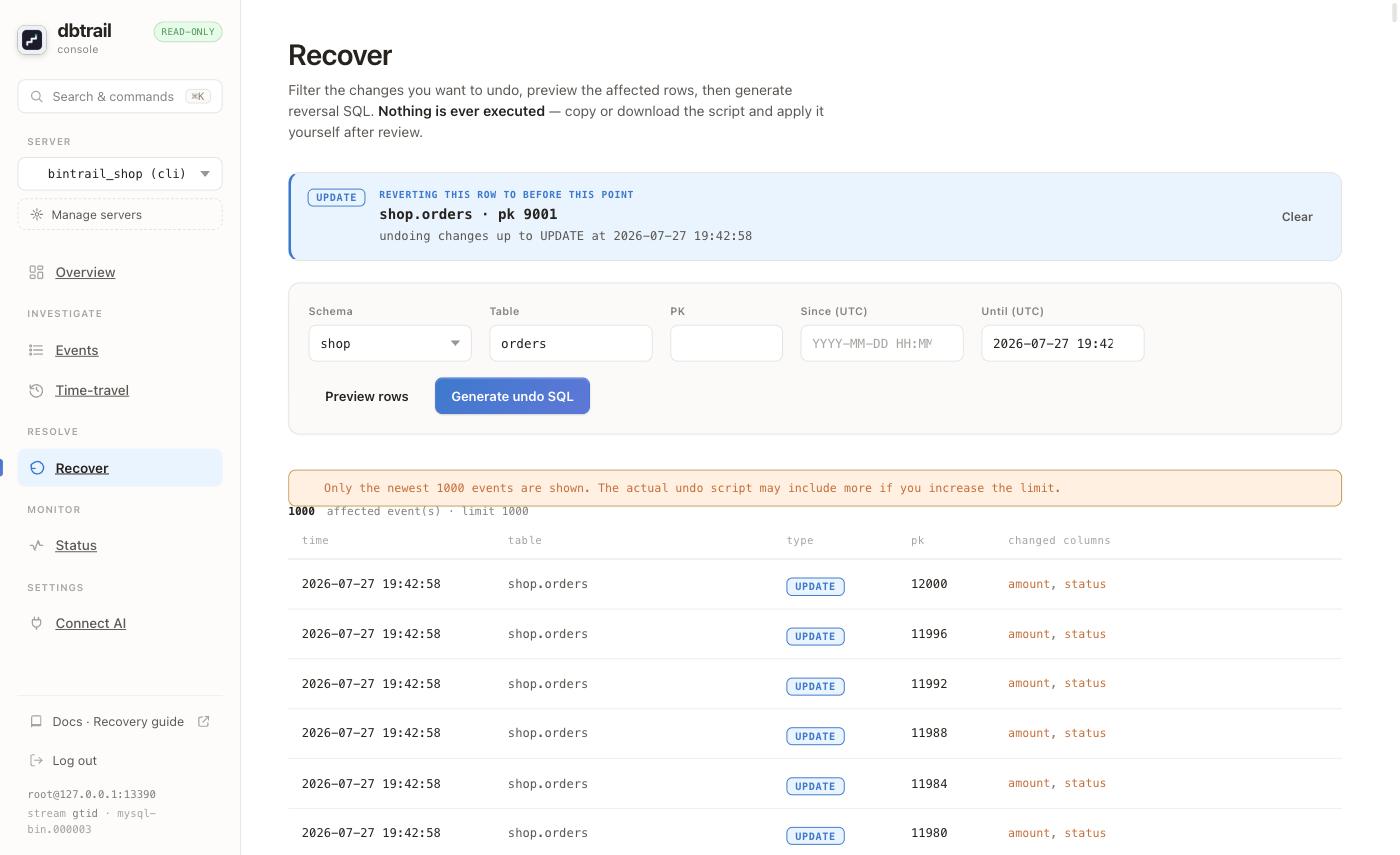
At five in the afternoon you want to see the row, not a digest. Here is a refund script whose WHERE matched more than intended, taking 3,001 orders to zero including one for 4,999.00.
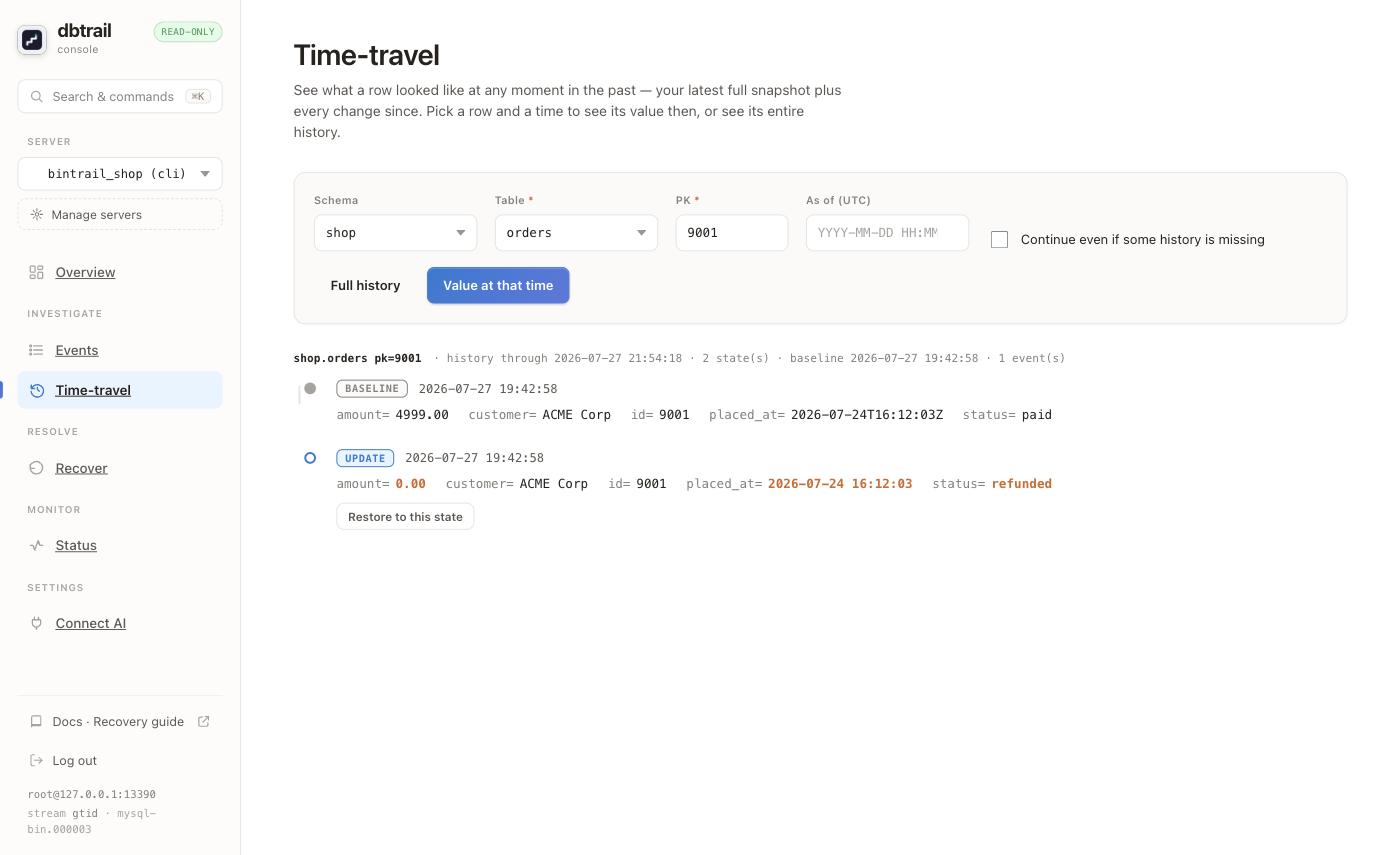
Restore to this state restores nothing. It writes the SQL that would, and hands it to you:
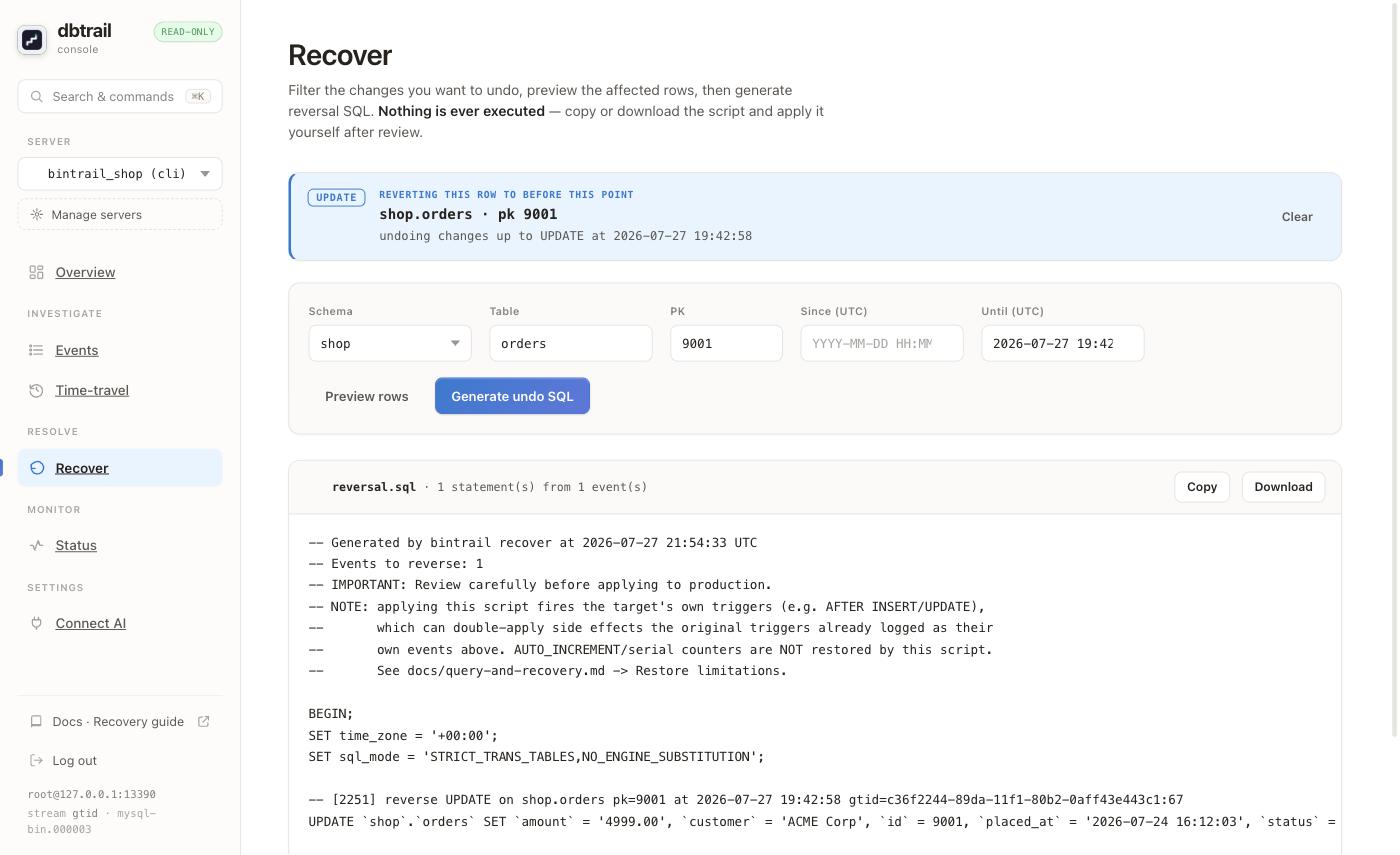
Read the comments before the SQL. Applying it fires the target’s own triggers, and AUTO_INCREMENT counters are not restored. Those two turn a clean recovery into a second incident.
Drop the primary key from the filter and you get the whole blast radius:
If you are upgrading this week
- Upgrade a restored snapshot first, only to read its
PrePatchCompatibility.log. One small instance for twenty minutes, and it tells you about your own accounts before you touch production. - Check who still uses
mysql_native_password. Those logins stop working on 8.4. - Put
binlog_format=ROWandbinlog_row_image=FULLon the target parameter group, not only the source. RDS moves you to the new group during the upgrade. - Run
pt-upgradewhile you still have an 8.0 to clone. It is the check you cannot run after the fact. - Start capture, then baseline, then run the comparison and keep the output. That is your control.
- Take your own snapshot right before you start. It is the only way back.
- Upgrade, compare again, diff against the control. Do not use a row count as your proof.
Outside RDS, shut the old server down cleanly first. A kill -9 on a busy 8.0 leaves you doing a restore instead of an upgrade.
One thing the binary log cannot see
On RDS the master user can run SET SESSION sql_log_bin = 0, and AWS does not block it. The proof is not that the statement is accepted, it is that the position does not move:
GTID before : ...:1-204     rows changed: 1
GTID after  : ...:1-204     value in the source: invisible to the binlog
Anything reading the binary log is blind to that write: replication, Debezium, your audit pipeline. A comparison against the live server still catches it, because it compares the rows that are there and not the log that was written.
Do not take my word
The upgrade did not touch my data, and yours will probably be the same. That is the boring outcome and the likely one.
The reason to check anyway is not the upgrade. It is everything else in a maintenance window: the script someone runs to unblock the deploy, the migration that half applied, the cleanup job that fired while the application was supposed to be off. Those do not announce themselves, and the count you took at midnight will not find them.
You have until July 31 on RDS. Point a comparison at your own database on a normal afternoon, when a red light costs you nothing but an hour. Then do it again on Saturday, and go to bed.
Get new posts by email
One email when a new post is out. Nothing else, and you can unsubscribe from any email.