The MariaDB approach vs the DB Trail for MySQL approach: Comparing time-travel

Two ways to keep database history: inline system versioning, or an external change-data-capture index on a separate machine. This is not a speed contest. It is about what survives a real incident, and what keeping history costs you in production every single day.
What actually matters
The belief this whole thing rests on is simple. When you need your data back, you should get it back. And it should not matter what the database went through to get from then to now.
Time passes, months of it. Schemas change, columns come and go, tables get rebuilt. Backups get taken and restored. A real database has a messy life, and none of that should stand between you and what your data looked like at some point in the past. If a column drop or a few months of uptime can put your old data out of reach, the history was never something you could lean on when it counted.
That is the lens for everything below, and it is why I am not opening with a speed chart. Speed is what everyone expects to see. For recovery I think it sits near the bottom of the list, and the numbers are near the end for anyone who wants them. The questions I actually care about are three:
- Does the history survive the normal things that happen to a database? A schema change. A backup and a restore.
- What does keeping it cost you in production, every day, whether or not you ever recover anything?
- Is it there when you need it, or did you have to decide to keep it before the incident you did not see coming?
DB Trail and MariaDB system versioning answer those three very differently. That is the real comparison, and it is the reason I built DB Trail the way I did.
The two approaches, in one paragraph each
DB Trail is external change data capture. It reads the MySQL ROW binlog into a separate index, on a separate machine, and recovers from there with reversal SQL or by rebuilding from a Parquet baseline. The history and the recovery both live off your production database. The one thing it needs from production is the binlog itself, configured a certain way, and I will be straight about that cost later.
MariaDB system versioning is the opposite idea. The history lives inside the table itself, in the same tablespace as your live rows, and you read it with SELECT ... FOR SYSTEM_TIME AS OF. It is convenient because it is right there. That convenience is also the source of every problem below.
One honest note about what I actually tested. This is DB Trail capturing from a MySQL source, compared against MariaDB’s native versioning on its own ground. When I ran the benchmark that was the only option, DB Trail spoke MySQL and nothing else. There is now an alpha MariaDB source mode (the index still stays MySQL), so DB Trail can capture from MariaDB too, but it is alpha, I did not test it here, and I will not make a single claim about it from this run. So read everything below as DB Trail + MySQL against MariaDB-native. The reason DB Trail exists at all is still MySQL, which has no native versioning (bug #99490 is open).
The exact match-up, and why these two versions
To be concrete about what is in the ring: MySQL 8.4 on the DB Trail side, MariaDB 11.4.12 on the other. Both are the current long-term-support release of their line, and picking them that way is the whole point.
There is no perfectly fair MySQL-to-MariaDB pairing, and there has not been one since the two forked. Different optimizers, different InnoDB lineages, completely different ways of storing history. So “closest” does not mean “the same”. It means closest on the things I could actually hold equal: release era, storage engine, the ability to run ROW binlog with full row images, and a mature versioning implementation rather than an early one.
On that basis, 8.4 against 11.4 is the tightest pairing there is. MySQL 8.4 went GA in April 2024, MariaDB 11.4 about a month later in May 2024, same generation of InnoDB. Both are LTS, which means both are what a careful shop actually runs in production, not a bleeding-edge build nobody has deployed. I did not use the older still-common pair (MySQL 8.0 with MariaDB 10.11) because it is years apart in age and 8.0 is already past end of life. I did not use MariaDB’s newest line (12.x) either, because then I would be putting a 2024 MySQL against a 2025 MariaDB, mismatched the other way.
One pin matters a lot: MariaDB has to be at least 11.4.10. The fix for historical AS OF partition pruning (MDEV-29114) only landed in 11.4.10, in late 2025, and pruning is the exact thing I spend half of this post testing. On an older 11.4 I would be measuring a bug, not the feature, so I ran 11.4.12 to sit safely on the fixed branch. And 8.4 is not a number I reached for to win an argument: DB Trail’s bundled index is MySQL 8.4 and its CI already runs against an 8.4 source, so it is simply what DB Trail is built on.
How each side answers a recovery query, and the exact queries
A comparison only means something if it is query against query, not a CLI against a query. MariaDB recovery is a SQL read, so DB Trail’s had to be one too, and here is the wiring that makes that possible.
MariaDB is the simple side. You send FOR SYSTEM_TIME AS OF straight to the server on port 3306 and it reads from the table.
DB Trail puts its recovery behind a small MySQL-protocol shim, with ProxySQL in front of it. The client sends a normal looking AS OF query, ProxySQL routes it to the shim, and the shim rebuilds the rows from the external index and returns them over the same MySQL wire protocol. A client cannot really tell it is talking to DB Trail instead of a database, except that the work happens on the off-box index, not on your production server. There are two virtual schemas: _snapshot is baseline-aware and can answer for any row, which is the fair match for MariaDB, and _flashback is binlog-only, faster but empty for a row that never changed. I timed both.
These are the actual queries, copied from the harness, not paraphrased.
Single row at a point in time:
-- DB Trail, through ProxySQL (:6033) into the shim
SELECT id, amount_cents FROM _snapshot.orders AS OF '2026-06-17 15:10:00' WHERE id = 1;
-- MariaDB, straight to the server (:3306)
SELECT id, amount_cents FROM orders FOR SYSTEM_TIME AS OF '2026-06-17 15:10:00' WHERE id = 1;
Whole table at a point in time:
-- DB Trail
SELECT id FROM _snapshot.orders AS OF '2026-06-17 15:10:00';
-- MariaDB
SELECT COUNT(*) FROM orders FOR SYSTEM_TIME AS OF '2026-06-17 15:10:00';
And the query that settled the pruning question, the EXPLAIN that shows how many partitions MariaDB actually opens for an old AS OF:
EXPLAIN PARTITIONS SELECT COUNT(*) FROM orders FOR SYSTEM_TIME AS OF '2026-06-17 15:10:00' WHERE customer_id >= 0;The DDL and backup tests use their own queries, shown right where I describe them.
Question 1: does the history survive a normal database life?
This is what “business critical” actually means to me. Not uptime numbers on a slide. It means that on the day you reach for the history, it is still correct and still there, even though the database had a normal life in between: migrations, ALTERs, backups, restores. I ran two probes for this, live, during the benchmark.
A DROP COLUMN erases versioned history
I made a table with a secret column, wrote real values with history, dropped the column, and then asked for the old value.
| result | |
MariaDB SELECT secret ... AS OF T after the drop |
ERROR 1054: Unknown column 'secret', gone |
DB Trail recover --until T after the drop |
returns secret='...', the same before and after the drop |
MariaDB keeps one table definition and reads all of history through it. Drop the column and its history is unreadable. DB Trail is era-aware: it stored the before and after image keyed by the column name that existed at event time, so the data of a dropped column still comes back. A schema migration is a Tuesday, not an edge case. If a routine ALTER can erase your history, it was never a history you could depend on.
This is the actual run, trimmed. After the column is gone, DB Trail still hands back its value, and MariaDB cannot:
-- DB Trail: recover --until T, run AFTER the column was dropped
UPDATE `app`.`widgets` SET `id`=1, `name`='alpha', `secret`='SECRET-ALPHA-7f3a9b001' WHERE `id`=1;

-- DB Trail: shim, _flashback.widgets AS OF T (the dropped column still comes back)
id    name    secret
1     alpha   SECRET-ALPHA-7f3a9b002

-- MariaDB: same column, after the drop
SELECT secret FROM widgets FOR SYSTEM_TIME AS OF '<T>' WHERE id=1;
ERROR 1054 (42S22): Unknown column 'secret' in 'SELECT'
One fairness note, because a MariaDB person will raise it and they are right to. I ran the drop with system_versioning_alter_history=KEEP. The default is ERROR, which refuses the ALTER outright, so out of the box MariaDB does not lose this silently, it blocks the operation. The catch is that to actually drop the column you have to switch to KEEP, and then it does lose the history. So it is not an ambush on a default config. It is the price of being allowed to evolve your schema at all, which most teams will pay sooner or later.
The default backup throws all the history away, silently
This is the quiet one, and the worst. I dumped the versioned table (555k history rows), restored it, and then checked whether time-travel survived, not just whether the rows did.
| backup method | restored AS OF T_OLD |
result |
mariadb-dump (default) |
empty | all history gone, no error, no warning |
mariadb-dump --dump-history (with insert_history=ON) |
correct value | fine, if you know the flag |
MySQL, plain mysqldump |
dropped column round-trips fine | fine, no special flag. Index lives outside |
The check that matters is not whether the rows came back, it is whether time-travel did. So I asked each restored copy for the same fixed old value the live table still returns (4000 at T_OLD):
ground truth, AS OF T_OLD on the live table  = 4000
  restored from default mariadb-dump          -> empty   (history lost, silently)
  restored from mariadb-dump --dump-history   -> 4000    (preserved)
To be fair, MariaDB 11.4 does have --dump-history. But it is off by default. The operator who runs a normal mariadb-dump restores the current state and silently loses every byte of history, and nothing tells them. And yes, an informed shop backs up a versioned table with mariabackup (physical), which keeps everything, so a MariaDB expert will tell me I tested the wrong backup. Fair. The trap is specifically the default logical path, mariadb-dump, which is the one a lot of people reach for first, and it is silent. DB Trail’s history is just ordinary rows in a normal table, so any mysqldump carries it whole. There is no flag to remember and no engine feature the backup tool has to understand. A backup that quietly drops the thing you are backing up is not a safety net.
Question 2: what does it cost you in production, every day?
This is the cost you pay whether or not you ever recover anything, and it is the whole reason I keep history out of the database.
It is not how big the history is, it is where it lives
Same traffic, two twin tables: one versioned, one plain.
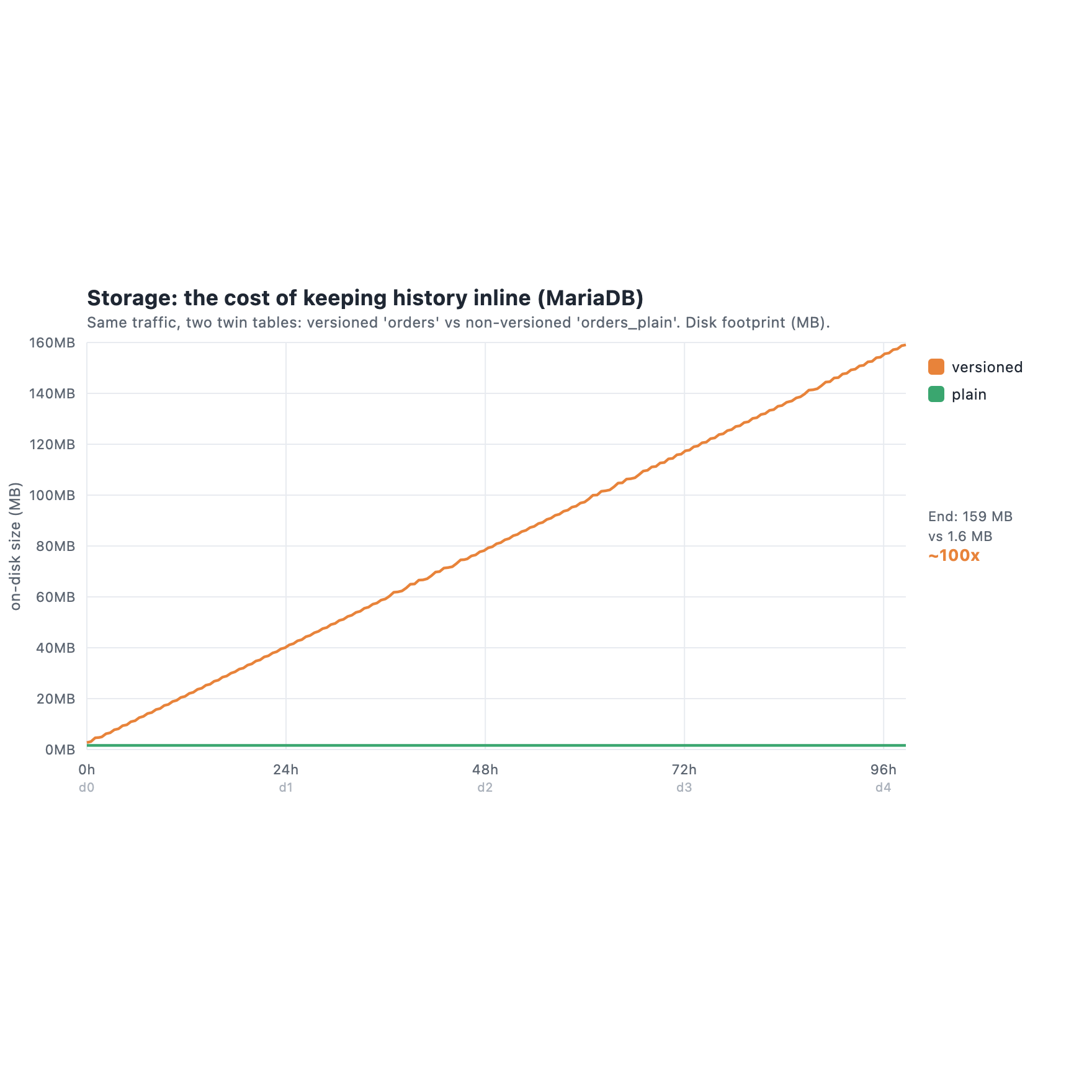
After four days the versioned table was 159 MB. The plain twin, taking the same writes but keeping no history, stayed at 1.6 MB. I want to read that gap honestly, because it is easy to oversell. Most of it is not waste. It is the cost of keeping history at all, and DB Trail pays that cost too: my index grew to 120 GB over the same run. So this is not “MariaDB stores more bytes than DB Trail”. If anything, MariaDB’s inline history is impressively compact. Keeping history is never free, on either side.
The difference is two other things. First, the history is inline, in the same tablespace as your live rows, and it has no ceiling. Your production table’s footprint climbs forever. At my 10k-row scale all 159 MB still fit warm in the buffer pool, so I did not see it hurt live queries and I will not claim I did. But it grows without limit, and at real scale that uncapped history ends up competing for the same buffer pool and bloating the same indexes your live queries use. The growth is what I measured. The pressure is where the growth leads.
Second, and this is the part I care about: DB Trail’s history is the same idea but on a different machine. Your production table stays 1.6 MB. However big the history gets, it is someone else’s RAM and someone else’s disk, and it never sits in the pool your live queries run in.
I owe you one honest exception to the word “external”. DB Trail reads the binlog, so it needs ROW format with binlog_row_image=FULL on your production source, and full row images make the binlog bigger. That is a real cost on the primary. Plenty of shops already run ROW and FULL for replication or point-in-time recovery, and then it costs nothing extra, but if you do not, DB Trail asks for it. That is the one thing it puts on your production box. The history and the recovery both stay off it.
The recovery itself does not touch production
A MariaDB AS OF is a query against your production server. So when you finally recover, during an incident, with the box already under stress, you are putting load on the exact machine you are trying to save. A heavy historical read competes with your live traffic at the worst possible moment.
DB Trail recovers on its own index box. The production database does not even see it. I do not need a benchmark for that one. It is a different computer.
Question 3: is it there when you need it?
MariaDB system versioning is opt-in, per table, and you have to turn it on before the incident. The table nobody thought to mark WITH SYSTEM VERSIONING has no history at all. You find that out on the worst day, which is the only day it matters.
DB Trail captures from the binlog. Everything that flows through the binlog is captured, every table, whether or not anyone planned for it. You do not have to predict in advance which table you will need to recover. For a recovery tool that is the whole game, because the incidents you can recover from cheaply are exactly the ones you did not see coming.
OK, but which one is faster?
People always ask, so here it is. And then I will explain why I think it barely matters.
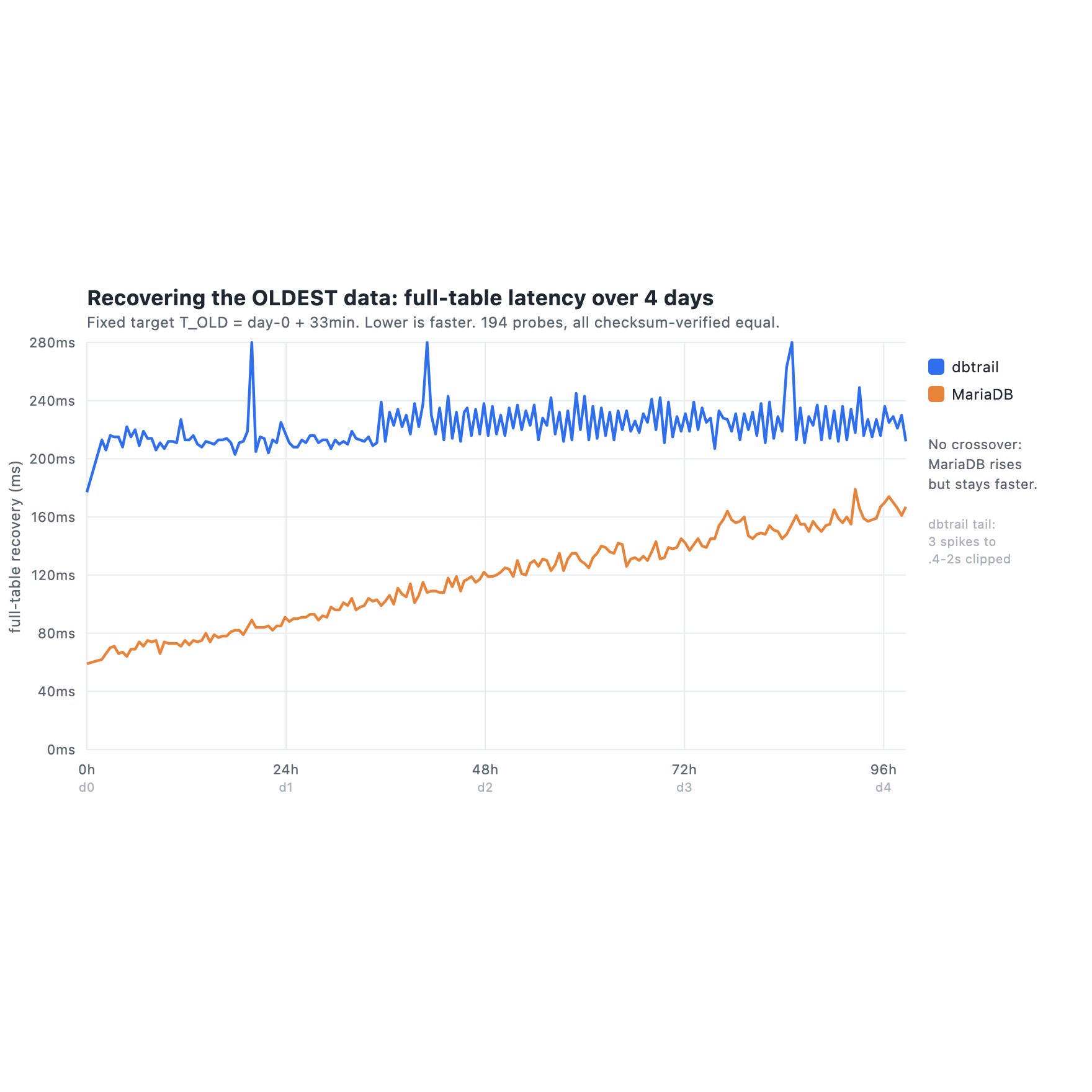
I recovered the same old timestamp every 30 minutes for four days, while history kept piling up, and timed it on both sides. Single-row recovery (undo one row by primary key) is a flat tie, both around 55 ms, because a primary key lookup does not care about table size. Full-table recovery is the chart above: DB Trail sits flat at about 220 ms, MariaDB starts near 60 ms and is still faster at the end of day 4, around 165 ms. For the four days I measured, MariaDB wins the latency, no crossover. I am not going to hide that.
Here is why it does not move me. First, the obvious one: this is recovery. 165 ms or 220 ms, on the day you are restoring data after an incident, is not a number any human will notice or care about. Nobody recovers on a millisecond budget.
Second, a correction to an instinct I had, and that an earlier draft of this post got wrong. I assumed cold cache obviously favors DB Trail at months-scale: a versioned table tens of GB deep stops fitting in RAM, so the AS OF reads go to disk. But for the oldest data specifically, MariaDB’s partition pruning cuts the other way. It reads the small, old partition, not the whole table, so “it does not fit in RAM” may not bite at all. Meanwhile DB Trail in cold cache has to replay deltas out of a 120 GB index, and its warm latency already spiked to 2 seconds on a few probes, so cold could hurt DB Trail more, not less. The honest answer is that I did not measure cold for either side, and I will not pretend I know who wins it. It is the biggest open question in this benchmark. It is also, one more time, a latency question, and latency is not the axis I would choose on.
The honest caveats
I am not going to pretend DB Trail is perfect or that this benchmark is the last word.
- Everything I measured was warm cache. I did not test cold or disaster recovery, which is exactly the situation you recover in. I do not know who wins cold. As I said in the speed section, pruning might hand it to MariaDB for old data, and DB Trail’s tail spikes could make it worse for DB Trail. It is an open question, not a result.
- I ran this at 10,000 live rows. That is small. Pruning, buffer-pool pressure, and the storage curve can all behave differently at 100M rows or more, and I did not test that. Read the trends as direction, not as numbers that transfer straight to your scale.
- I partitioned MariaDB by
INTERVAL 1 HOUR, which is finer than anyone runs in production (you would use daily or weekly). I picked it to push the partition count up fast, since that was the thing I wanted to stress. The fact that pruning held even with 100 partitions is to MariaDB’s credit, not against it. - On pure point-in-time correctness, MariaDB has the cleaner model. Its
AS OFis an MVCC-consistent read, correct by construction. DB Trail’s reconstruct is correct within the caveats here, and a same-column-countALTER(aMODIFYof a type, aCHANGErename) can silently cross-map columns if you skip the re-snapshot step. DB Trail handles the everyday cracks well. It does not handle everything, and it is the one with the asterisks on correctness. - DB Trail has worse tail latency. Its 220 ms median hides occasional spikes, three probes hit 400 ms up to 2 seconds (DuckDB cold scans or garbage collection). MariaDB’s reads were consistently tight. If you care about p99, that is a real point for MariaDB.
- One sample per cell, one workload, one row shape. This is a trajectory over four days, not a paper with variance bars. The 2-second spikes are a reminder that the instrument has real variance, so treat the daily slope as a shape, not as exact deltas.
- And again, what I tested is DB Trail + MySQL against MariaDB. The point of the comparison is the architecture, not a drop-in swap. A MariaDB shop can only run DB Trail through the alpha source mode I mentioned at the top, which I did not test here, so treat this as a comparison of two approaches, not a tool you deploy on MariaDB today.
What I actually think
If you run MariaDB and you want to glance at the recent past, undo a fat-finger, diff a row against an hour ago, system versioning is right there and it is fast. For that, it is handy, and I will not pretend otherwise.
But handy is not the same as dependable, and a recovery system has to be dependable. The moment your history is something you recover from instead of something you browse, system versioning keeps failing in the same quiet way. A DROP COLUMN erases it (unless the default ERROR setting blocks your migration instead). A normal mariadb-dump loses it. It grows your production table without limit the whole time it sits there, and it is only there at all if someone remembered to turn it on before the incident. None of those are exotic. They are a migration, a backup job, an oversight, and the passing of time. For me, that puts it closer to a query convenience than to something you build a business-critical recovery process on.
DB Trail makes the opposite trade on purpose. The history lives outside the database, so it does not slow production down, it survives the schema changes and the backups that break the in-table version, and it captures everything from the binlog instead of waiting for you to opt a table in. It is slower on a warm single recovery, and I am fine with that, because that is the one thing on the list that does not matter when it counts.
If you run plain MySQL, there is no in-table convenience to fall back on at all, and the question stops being “which one” and becomes “this or nothing”. That is the ground DB Trail was built for.
Reproducibility
- Raw data, every probe over four days:
results.oldest.jsonl(205 lines) andresults.health.jsonl(201 lines). - Hardware: three AWS
r7i.2xlarge(8 vCPU, 64 GiB), gp3 600 GiB, us-west-2, one each for the MySQL source, the DB Trail index, and MariaDB. All three tuned identically (48 GiB buffer pool,O_DIRECT, matched IO settings), not defaults. - Versions: MySQL 8.4 (source and index), MariaDB 11.4.12 (at least 11.4.10, for the MDEV-29114 pruning fix),
bintrailv0.14.0. - Charts generated from the raw JSONL with no dependencies. No hand-typed numbers.
- Cost of the run: about $181 (three
r7i.2xlargefor roughly 101 hours plus EBS), on-demand.
The exact tuned config for each box, the full methodology, and the DDL and backup probe transcripts are in the companion results doc.