Time-travel for PostgreSQL: one SELECT vs a full restore vs replaying the WAL

PostgreSQL now lets you ask what a row contained at any moment in the past, using a normal SELECT. This post shows the idea with one small example, and compares it with the two classic ways to recover data on Postgres: restoring a backup, and replaying the WAL.
The problem
Consider a common accident. A refund script runs, and its WHERE clause matches more rows than intended:
UPDATE orders SET status = 'refunded', amount = 0 WHERE 1;An order for ACME Corp that should read 4999.00 and paid now reads 0.00 and refunded, together with several hundred others. The question you need to answer is narrow and precise: what did that row contain before the change? On PostgreSQL there are three ways to get that answer. Let us go through all three.
Option 1: restore the full backup
This is the classic path. You have a nightly pg_dump or a snapshot, so you restore it into a second instance, because you cannot overwrite production back to last night over a single wrong UPDATE.
Then you wait for the restore to finish, connect to the copy, read the order, copy the value back into production by hand, and remove the copy.
There is also a limit that is easy to forget. If ACME placed that order this morning, after last night’s backup ran, the backup does not contain the correct value at all. You restored an entire database to look for a row that was never in it.
Option 2: replay the WAL (point-in-time recovery)
PostgreSQL has a better answer here, and it is genuinely useful. If you archive your write-ahead log, you can take a base backup and replay the WAL forward to a precise instant, using recovery_target_time. On RDS this is a single button, “Restore to point in time”.
It is precise to the second. It also creates a brand new database instance. You end up with a full parallel cluster, frozen at the chosen moment, an entire copy of production, so that you can read one row out of it.
You provision it, wait for it to start and replay, read the row, copy it back, and then delete the copy. Precise in time, and very large in scope. And it only works if the WAL for that moment is still inside your retention window.
Option 3: ask
Same psql client, same SQL, two extra words: AS OF.
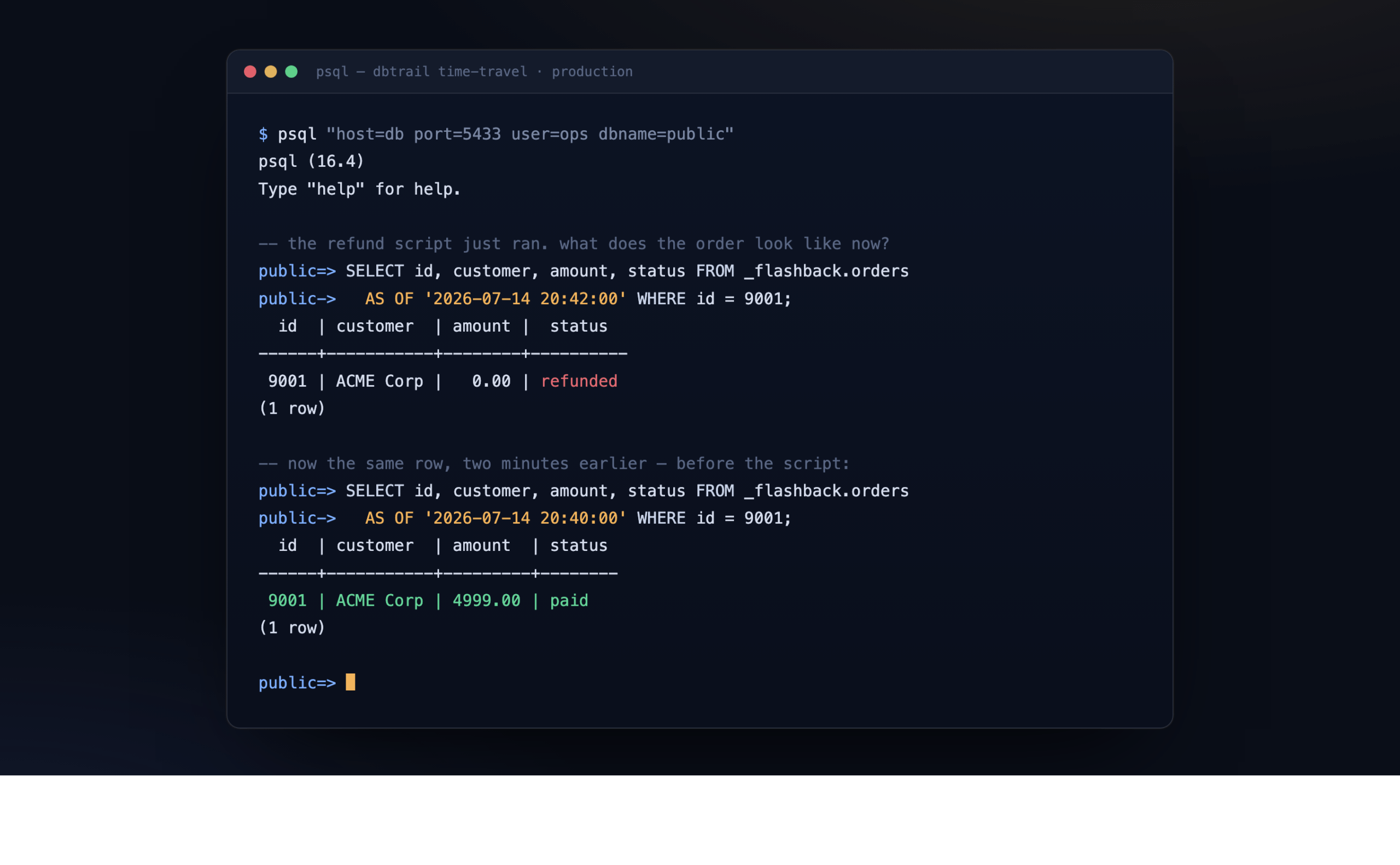
-- the same row, after the refund script ran:
public=> SELECT id, customer, amount, status FROM _flashback.orders
public->    AS OF '2026-07-14 20:42:00' WHERE id = 9001;

  id  | customer  | amount |  status
------+-----------+--------+----------
 9001 | ACME Corp |   0.00 | refunded
(1 row)

-- the same row, a moment before the change:
public=> SELECT id, customer, amount, status FROM _flashback.orders
public->    AS OF '2026-07-14 20:40:00' WHERE id = 9001;

  id  | customer  | amount  | status
------+-----------+---------+--------
 9001 | ACME Corp | 4999.00 | paid
(1 row)
There it is: 4999.00 and paid, the row exactly as it was before the change. No second instance, no copy, no restore. One SELECT, you read the value and you put it back.
The three questions side by side
| Restore the backup | Replay the WAL (PITR) | dbtrail time-travel | |
|---|---|---|---|
| What you get back | The whole database, as of last night | The whole cluster, as of the chosen instant | Just the row, as of the chosen instant |
| Extra infrastructure | A second instance to restore into | A brand new instance (RDS starts one for you) | None |
| Time to an answer | Minutes to hours, growing with database size | About 10 to 40 minutes for the instance plus replay | Seconds |
| What you lose | Everything written since the backup | Nothing, but you rebuilt the database to read one cell | Nothing |
| If the row was created after the last backup | It is not in there | Recoverable, if the WAL is still retained | Recoverable, within its retention window |
| Can you do it without a clone | No | No | Yes |
Backups and point-in-time recovery are not going away. They are how you survive a lost disk, a dropped database, or a region going down, and they are good at that. But notice what all of that machinery is for: rebuilding a whole database so you can look inside it. None of it was designed to answer the small and specific question, what did this one row contain a moment ago. That is the question dbtrail answers directly. For bringing back a single row, it makes the restore unnecessary.
In the browser
The same capability is available in a read-only web console, for people who prefer a UI over psql. You pick a table, choose a moment, and read the row as it was then. You can also open the full history of a row and see every change, one state at a time, with the option to restore any of them.
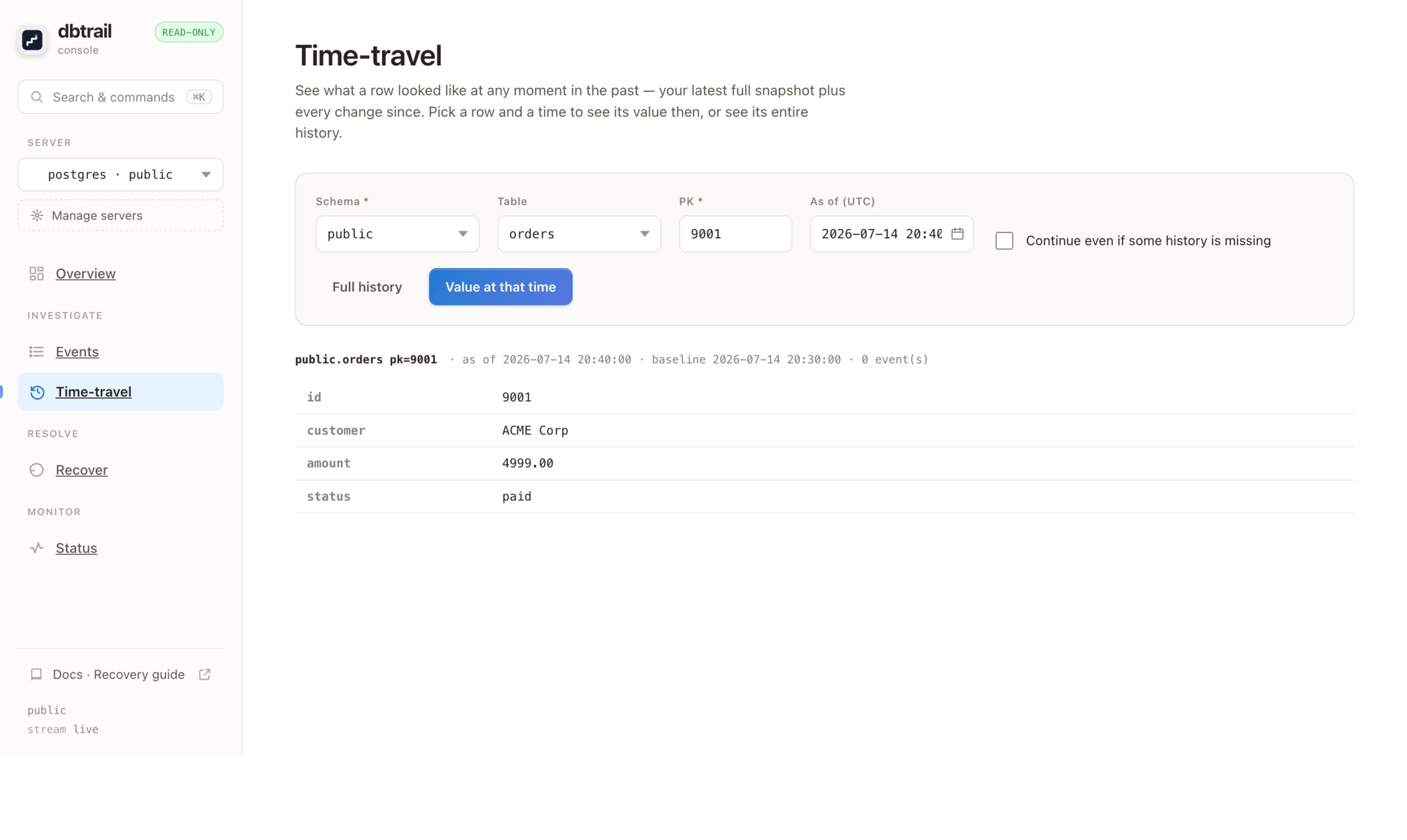
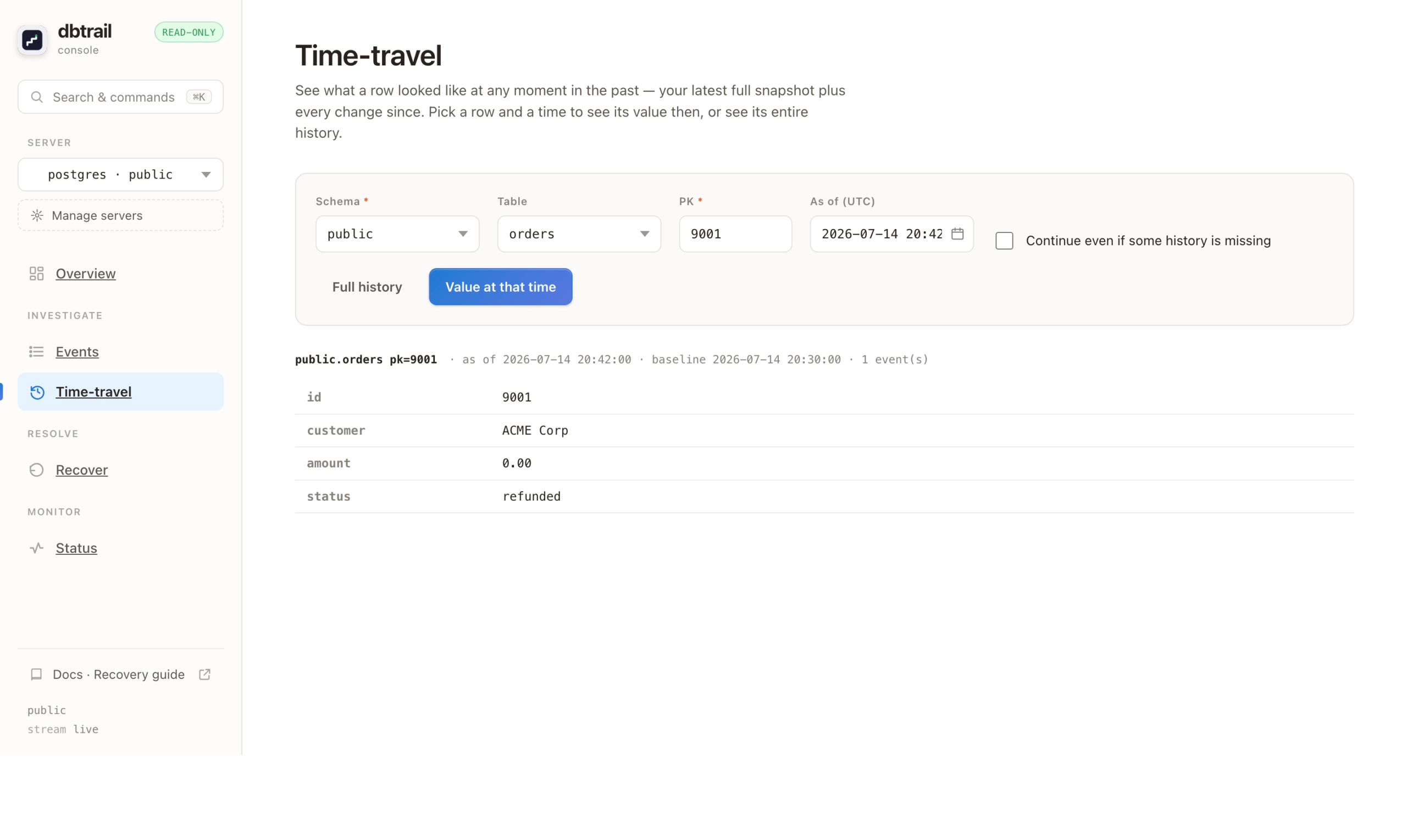
the console Time-travel view, table public.orders, showing order 9001 as ACME Corp / 4999.00 / paid at one moment, and 0.00 / refunded at a later one.
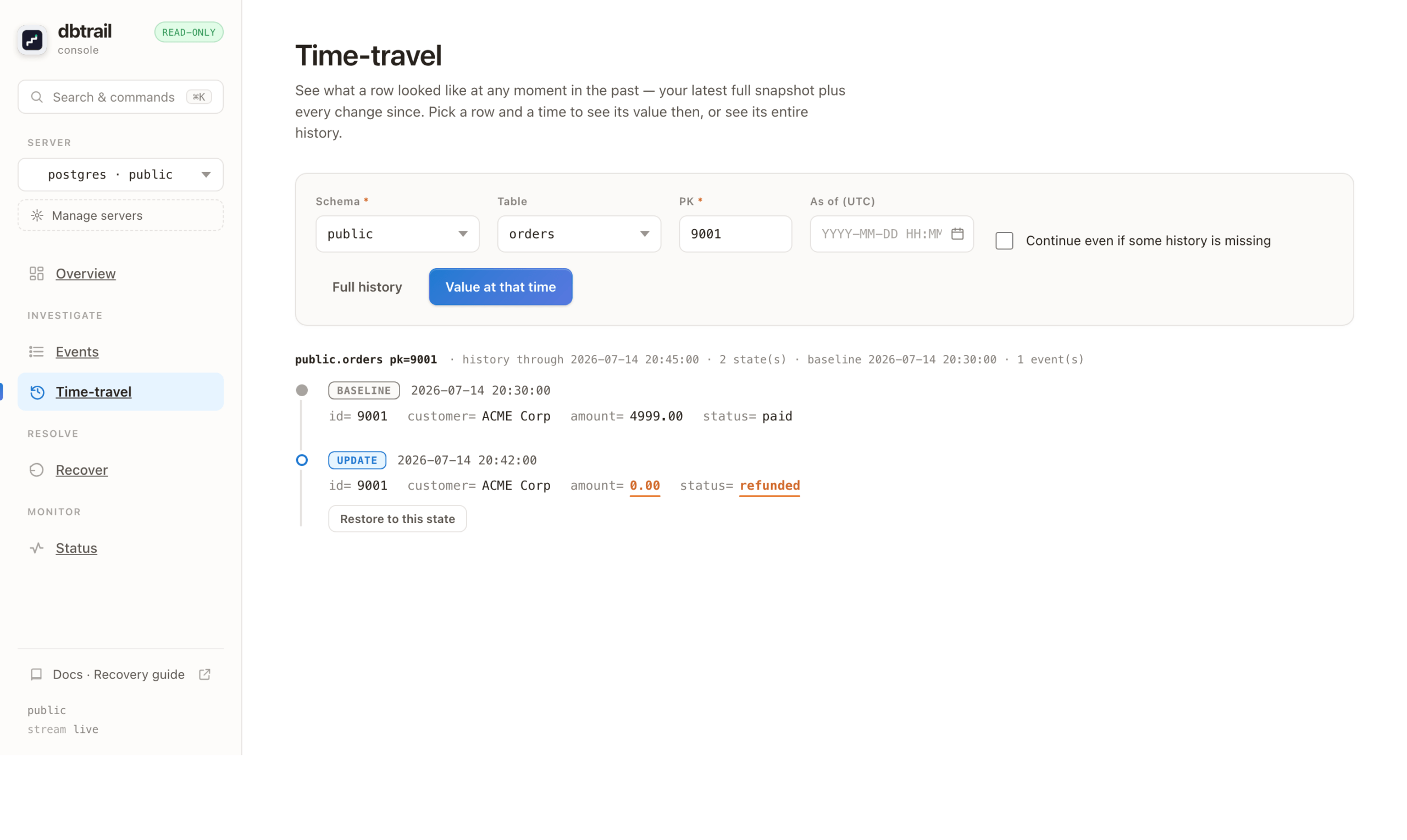
the full history of the row: a BASELINE state marked paid, then an UPDATE that turned it into refunded, each with a Restore button.
What PostgreSQL needs
PostgreSQL users tend to want the details, so here they are. dbtrail captures changes as an ordinary logical replication client, using PostgreSQL’s built-in pgoutput plugin. It installs nothing in your database: no extension, no output plugin, no event trigger, nothing to CREATE. What it needs is standard logical replication configured on the source.
| On your PostgreSQL source | Detail |
|---|---|
| PostgreSQL 14 or newer | Versions 14, 15, 16 and 17 are tested in CI. |
wal_level = logical | Server wide, and it needs a restart. bintrail-pg refuses to start without it. |
A role with the REPLICATION attribute | Opens the replication stream and creates the slot. On managed PostgreSQL, grant the provider’s replication role, for example GRANT rds_replication TO your_role on RDS and Aurora. |
REPLICA IDENTITY FULL on each captured table | The PostgreSQL analog of MySQL’s binlog_row_image = FULL. Without it, PostgreSQL logs only the primary key, and the previous values are lost. |
A PUBLICATION covering those tables | You create it. bintrail-pg checks that it exists and covers your tables, and never creates it for you. |
| A replication slot | Created for you on first run, and reused on restart. |
max_replication_slots and max_wal_senders | At least 1 of each. The default of 10 is usually enough. One slot uses one of each. |
max_slot_wal_keep_size set to a bound | Strongly recommended. Left unlimited (-1), a stalled slot can pin WAL until the source disk fills. bintrail-pg doctor warns while it is unlimited. |
There is a preflight for all of this. bintrail-pg doctor connects to your source, checks every item above, and prints exactly what to fix. The history itself is kept in dbtrail’s own store, which ships as a container, so the original WAL can be long gone and you can still ask what a row contained.
The honest part
PostgreSQL support is in beta, and today it is row-level time-travel: give me this row, as of this moment. Reconstructing a full table as of a past time is on the roadmap. It runs against managed PostgreSQL, and the one thing you set up front is REPLICA IDENTITY FULL on the tables you care about.
Try it on a throwaway database
dbtrail is open source, under Apache 2.0. The clearest way to evaluate it is to cause a small, controlled accident and then reverse it:
- Clone the repository, run
docker compose up, and pointbintrail-pgat a test PostgreSQL. - Run a wrong
UPDATE. - Read the row back with a
SELECT ... AS OF.
The five-minute Postgres setup is in the Postgres guide:
Every change leaves a trail. Now you can follow it back on PostgreSQL too.