Time-travel SQL for MySQL, finally

A time ago I argued MySQL is the only major OLTP database without time-travel queries. Here’s what’s changed.
Last month I mapped out how every major OLTP except MySQL gives you point-in-time queries out of the box. Oracle has AS OF TIMESTAMP. SQL Server has FOR SYSTEM_TIME AS OF. MariaDB ships system-versioned tables. PostgreSQL has three extensions that get you there.
Vanilla MySQL: nothing.
There’s now a way to close that gap without forking MySQL, without an ALTER TABLE storm, and without rewriting the application. It’s called bintrail, and once you deploy it behind ProxySQL, your MySQL fleet learns three new query shapes.
What it looks like
-- The state of order #42 at any past instant
SELECT * FROM _flashback.orders
  AS OF '2026-04-15 09:30:00'
  WHERE id = 42;

-- Or the whole table at that instant (every row that existed then)
SELECT * FROM _flashback.orders AS OF '2026-04-15 09:30:00';

-- Every change to order #42 in a time window
SELECT * FROM _diff.orders
  BETWEEN '2026-04-15 00:00:00' AND '2026-04-15 23:59:59'
  WHERE id = 42;
There’s no ALTER TABLE to enable system-versioning, no special storage engine, no binary log replay tooling to wire up. You point your existing MySQL connection at ProxySQL instead of the real MySQL port, and the rest just works.
The application sends a SQL statement and gets a row back.
How it stacks up against the dialects MySQL has been missing
| Database | Syntax |
|---|---|
| Oracle | SELECT * FROM orders AS OF TIMESTAMP TO_TIMESTAMP('2026-04-15 09:30', 'YYYY-MM-DD HH24:MI') WHERE id = 42; |
| SQL Server | SELECT * FROM orders FOR SYSTEM_TIME AS OF '2026-04-15T09:30' WHERE id = 42; |
| MariaDB | SELECT * FROM orders FOR SYSTEM_TIME AS OF '2026-04-15 09:30' WHERE id = 42; |
| MySQL | ❌ not supported |
| MySQL + bintrail | SELECT * FROM _flashback.orders AS OF '2026-04-15 09:30:00' WHERE id = 42; |
The bintrail syntax is shorter than Oracle’s (no TIMESTAMP TO_TIMESTAMP(...) ceremony) and works without per-table setup. There’s no ALTER TABLE to declare anything as ‘system-versioned’. Bintrail starts indexing whatever binlog history MySQL still has on disk the moment you deploy it, plus everything after. The moment bintrail starts indexing your binlog, every table is queryable as of any point in the recorded history.
And _diff returns the change events (event type, GTID, before and after image) over a time range. SQL Server’s FOR SYSTEM_TIME BETWEEN and MariaDB’s equivalent return row versions in the range, which is close but not the same shape. Oracle’s VERSIONS BETWEEN is the closest analogue but requires flashback storage configured on the table and is bounded by the undo retention window.
With bintrail, _diff walks the indexed binlog stream and returns every change to a row over any time range: full audit history with one query.
A real session
Here’s what it looks like in a terminal. An order gets created, updated, then accidentally deleted, and we recover its state from before the delete without touching a backup.
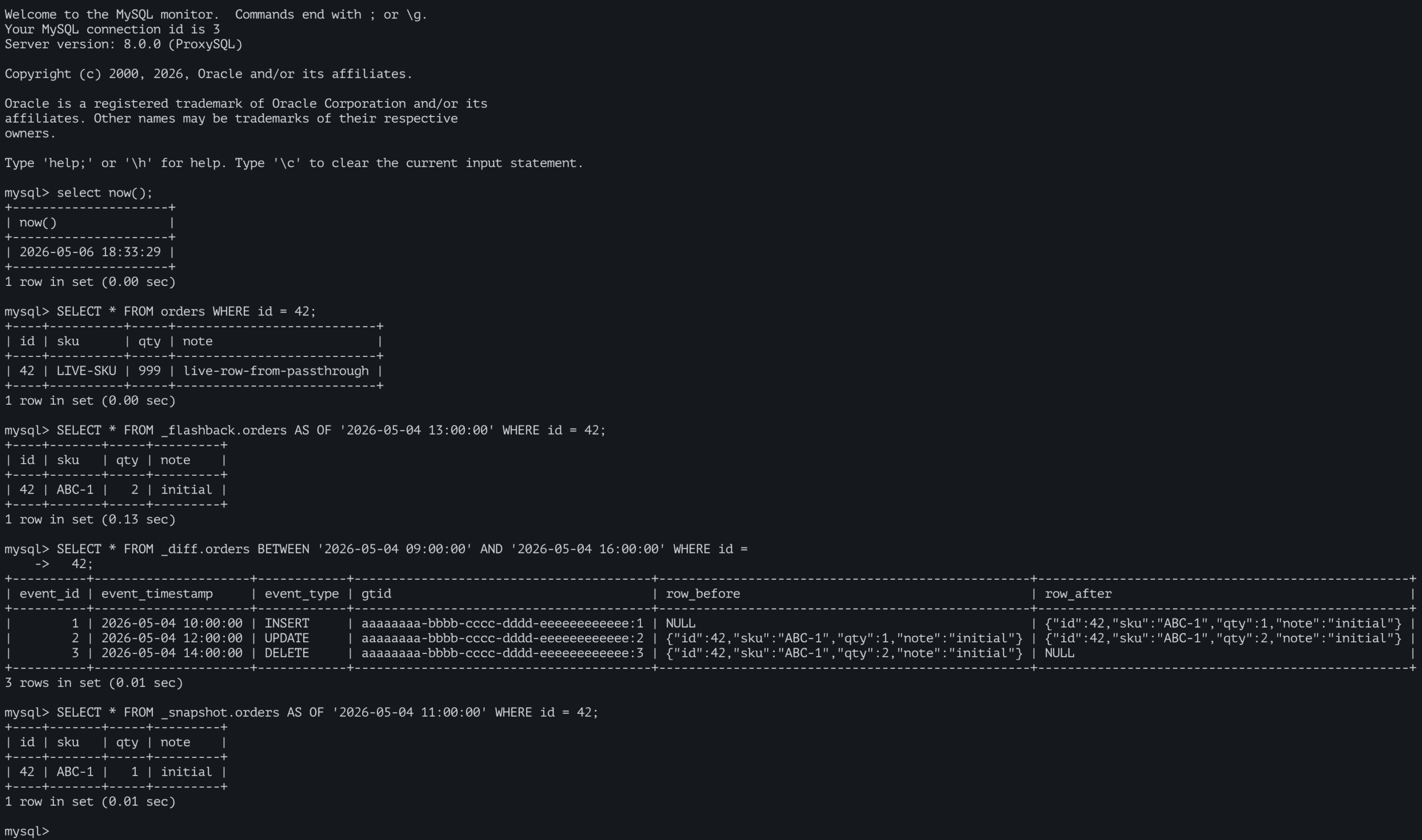
mysql> SELECT * FROM orders WHERE id = 42;
+----+----------+-----+---------------------------+
| id | sku      | qty | note                      |
+----+----------+-----+---------------------------+
| 42 | LIVE-SKU | 999 | live-row-from-passthrough |
+----+----------+-----+---------------------------+
1 row in set (0.00 sec)

mysql> -- Whoops, what was this row 10 minutes ago?
mysql> SELECT * FROM _flashback.orders
    -> AS OF '2026-05-04 13:00:00'
    -> WHERE id = 42;
+----+-------+-----+---------+
| id | sku   | qty | note    |
+----+-------+-----+---------+
| 42 | ABC-1 |   2 | initial |
+----+-------+-----+---------+
1 row in set (0.02 sec)

mysql> -- And the full history of changes?
mysql> SELECT event_timestamp, event_type, row_after
    -> FROM _diff.orders
    -> BETWEEN '2026-05-04 00:00:00' AND '2026-05-04 23:59:59'
    -> WHERE id = 42;
+---------------------+------------+--------------------------------------------------+
| event_timestamp     | event_type | row_after                                        |
+---------------------+------------+--------------------------------------------------+
| 2026-05-04 10:00:00 | INSERT     | {"id":42,"sku":"ABC-1","qty":1,"note":"initial"} |
| 2026-05-04 12:00:00 | UPDATE     | {"id":42,"sku":"ABC-1","qty":2,"note":"initial"} |
| 2026-05-04 14:00:00 | DELETE     | NULL                                             |
+---------------------+------------+--------------------------------------------------+
3 rows in set (0.02 sec)
That’s three different queries answering three different questions. The first one hits the live MySQL and returns the current state of the row. The second reaches past the DELETE and reconstructs what the row looked like earlier. The third walks the indexed change history and returns every event for that row, in chronological order.
You get recovery without touching backups, and audit trails without instrumenting the application.
Your application doesn’t change
That’s the part that matters. There’s no new driver to install, no connection string trick, no SDK to integrate. If ProxySQL already sits in front of your MySQL fleet, bintrail goes behind it as a sidecar:
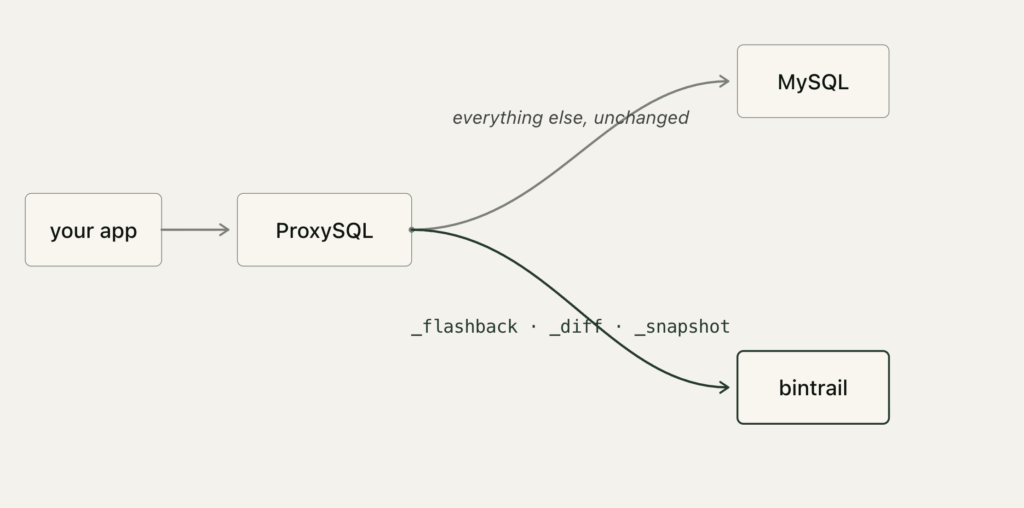
The same connection serves both worlds. The ORM doesn’t see anything different, the DBA team doesn’t need to retrain, and every tool that already speaks MySQL keeps speaking MySQL.
The routing, in three rules
ProxySQL only needs to know about two backends and three query rules:
-- Two backend hostgroups
INSERT INTO mysql_servers (hostgroup_id, hostname, port) VALUES
  (990, 'mysql.your-network.internal', 3306),  -- your real MySQL
  (991, '127.0.0.1',                   3308);  -- bintrail-shim sidecar

-- Route any query mentioning _flashback / _diff / _snapshot to the
-- shim hostgroup. Everything else falls through to the passthrough.
INSERT INTO mysql_query_rules
  (rule_id, active, match_pattern, destination_hostgroup, apply)
VALUES
  (990001, 1, '\b_flashback\.', 991, 1),
  (990002, 1, '\b_diff\.',      991, 1),
  (990003, 1, '\b_snapshot\.',  991, 1);

LOAD MYSQL SERVERS     TO RUNTIME;
LOAD MYSQL QUERY RULES TO RUNTIME;
SAVE MYSQL SERVERS     TO DISK;
SAVE MYSQL QUERY RULES TO DISK;
You don’t have to write that by hand. bintrail proxysql-config reads the connection details from .bintrail.env plus the tenant list from shim.yaml and emits the full script, including the mysql_users entries from the tenants you list in shim.yaml. Pick the same credentials your app already uses so the connection string only changes host:port:
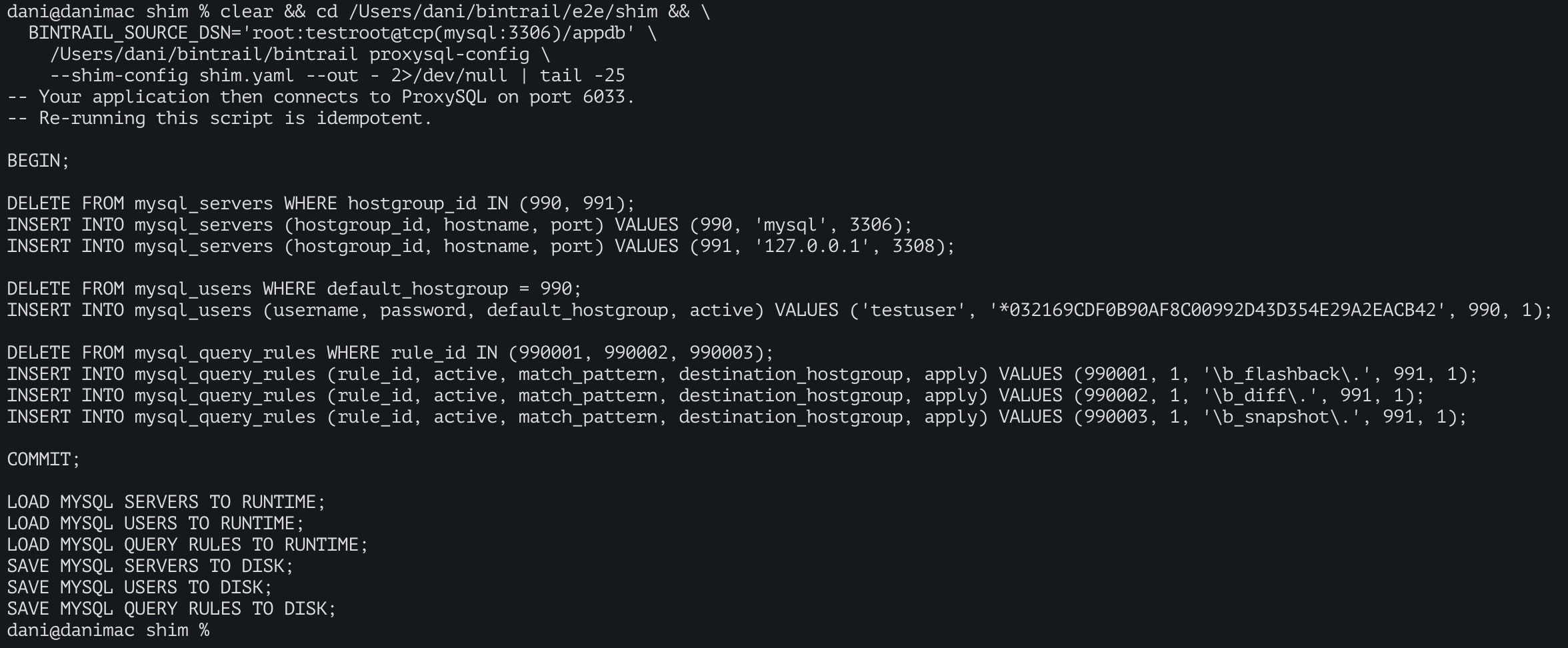
$ bintrail proxysql-config --out -
BEGIN;

DELETE FROM mysql_servers WHERE hostgroup_id IN (990, 991);
INSERT INTO mysql_servers (hostgroup_id, hostname, port) VALUES (990, 'mysql.your-network.internal', 3306);
INSERT INTO mysql_servers (hostgroup_id, hostname, port) VALUES (991, '127.0.0.1', 3308);

DELETE FROM mysql_users WHERE default_hostgroup = 990;
INSERT INTO mysql_users (username, password, default_hostgroup, active) VALUES ('appuser', '*<sha1-hash>', 990, 1);

DELETE FROM mysql_query_rules WHERE rule_id IN (990001, 990002, 990003);
INSERT INTO mysql_query_rules (rule_id, active, match_pattern, destination_hostgroup, apply) VALUES (990001, 1, '\b_flashback\.', 991, 1);
INSERT INTO mysql_query_rules (rule_id, active, match_pattern, destination_hostgroup, apply) VALUES (990002, 1, '\b_diff\.', 991, 1);
INSERT INTO mysql_query_rules (rule_id, active, match_pattern, destination_hostgroup, apply) VALUES (990003, 1, '\b_snapshot\.', 991, 1);

COMMIT;

LOAD MYSQL SERVERS TO RUNTIME;
LOAD MYSQL USERS TO RUNTIME;
LOAD MYSQL QUERY RULES TO RUNTIME;
SAVE MYSQL SERVERS TO DISK;
SAVE MYSQL USERS TO DISK;
SAVE MYSQL QUERY RULES TO DISK;
Pipe it straight into the ProxySQL admin port and you’re routing:
bintrail proxysql-config --out - | mysql -h proxysql -P 6032 -u admin -padminWith three rules and two backends, ProxySQL becomes a transparent time-travel router. The application sees one MySQL connection, and bintrail only sees the queries that need its help.
The time horizon is whatever you keep indexed, not your MySQL binlog retention.
Bintrail’s index is a regular MySQL table, partitioned by hour, with its own retention knob (bintrail rotate --retain 30d keeps a month, --retain 365d keeps a year). Events stream into the index in real time, so MySQL is free to roll its binlogs underneath without affecting how far back _flashback reaches. Partitions that age out of the live index can be archived to Parquet on S3, and _flashback queries merge live + archived results transparently.
Honest scope
A few caveats so you know what you’re getting:
AS OFtakes a literal timestamp string. Oracle-styleSYSDATE - 5/1440arithmetic isn’t supported. For now:AS OF '2026-04-15 09:30:00'.- The syntax uses a virtual schema prefix (
_flashback.<table>), not the inline<table> AS OF ...form. This is a deliberate trade-off: ProxySQL routes by a regex match on the schema prefix, which keeps the deployment dead simple. Three rules, no SQL parsing in the proxy layer. - Auth scheme defaults to
mysql_native_password, which keeps it compatible with ProxySQL 2.6 LTS out of the box. For MySQL 8.4+ environments wheremysql_native_passwordis disabled,caching_sha2_password(andsha256_password) are opt-in via--auth-method=caching_sha2_passwordonbintrail shim. The SHA2 path requires ProxySQL 2.7+ between the application and the shim. - Point lookups and full-table reconstruction; no SQL planner. Both
WHERE <pk> = <value>lookups and bareSELECT * FROM _flashback.<table> AS OF '<ts>'(the whole table at that instant, with DELETEs correctly suppressed) work interactively against the shim. Full-table queries are buffered and capped at 100,000 rows by default. Overflow surfaces asER_TOO_BIG_SELECT(1104) with a hint to narrow the AS OF or add a PK filter. JOINs, aggregations, and non-PK WHERE filters still happen outside the shim: pipe the resultset toduckdborpandas. A streaming wire-protocol path (no row cap) is deferred until an operator reports it as a real bottleneck.
Error codes
The shim emits typed MySQL wire codes so ORMs and monitoring can distinguish bad queries from server faults. A 1105 spike no longer means “any time-travel query failed”. The codes you may see:
| Code | MySQL name | What it means |
|---|---|---|
| 1064 | ER_PARSE_ERROR | Malformed time-travel query (unparseable timestamp, missing AS OF / BETWEEN, no USE <db>). |
| 1104 | ER_TOO_BIG_SELECT | Full-table reconstruction exceeded the 100,000-row cap. Narrow the AS OF or add a PK filter. |
| 1235 | ER_NOT_SUPPORTED_YET | Non-virtual-schema query reached the shim. ProxySQL routing is misconfigured. |
| 1526 | ER_NO_PARTITION_FOR_GIVEN_VALUE | The AS OF / BETWEEN range falls outside what the index retains (no archive coverage). |
| 1045 | ER_ACCESS_DENIED_ERROR | Credential mismatch between shim.yaml and ProxySQL’s mysql_users. |
| 1105 | ER_UNKNOWN_ERROR | Real internal failure (DB timeout, archive S3 outage). Inspect the shim log. |
The split matters operationally: 1235 means fix ProxySQL routing, 1526 means widen retention or check archive_state, 1105 is the catch-all “the server is broken, retry” signal. Page on 1105; dashboard the rest.
Try it
Bintrail is open source. The deployment is a few commands:
bintrail init   --index-dsn '...'        # create the index tables
bintrail stream --source-dsn '...' ...   # index your binlog in real time
bintrail shim   --index-dsn '...' ...    # serve the time-travel queries
Plus a one-shot bintrail proxysql-config to generate the ProxySQL routing SQL.
The rig in the repo is tested against ProxySQL 2.6.x LTS, the line the ProxySQL maintainers recommend for production deployments.
The repo also includes a docker-compose-driven end-to-end test that boots the full stack (MySQL, ProxySQL, bintrail-shim) on your laptop in under a minute, so you can run the queries above against a real deployment before committing to anything.
For the skeptics:the chain mysql client → ProxySQL → bintrail → MySQL index is exercised end-to-end by a docker-compose-driven test that asserts wire-protocol behaviour, ProxySQL routing, and time-travel semantics together as one integrated unit. Run it locally with cd e2e/shim && ./run.sh.
MySQL was the last major OLTP missing point-in-time queries. With bintrail behind ProxySQL, you have them.
Hi Daniel,
Nice post.. I have few questions,
How does Time Travel SQL handle multi-TB tables does it store history in the same tablespace or a separate one?
Is there automatic history retention/expiry (TTL) or does history grow unbounded like MariaDB?
Is there a way to monitor history table growth separately from the main table?
How does this interact with table partitioning, can you partition history separately?
Thanks for your comment, Pon. I wrote a whole post to reply your questions: https://blog.dbtrail.com/time-travel-sql-storage-retention-partitioning/